














Field team task management is organizing and overseeing work done by mobile teams at job sites. In the U.S., it ensures jobs are assigned, tracked, and verified with proof of work to meet customer expectations and legal compliance. Using digital tools streamlines operations, reduces errors, and boosts service quality.
Key takeaways
- Field team task management helps U.S. businesses organize onsite jobs, track progress, and collect proof of completion.
- Efficient task boards, job cards, and mobile apps simplify scheduling and communication between office and field workers.
- Time tracking and reporting tools provide insights needed for payroll accuracy and job costing.
- Compliance with U.S. laws and customer expectations means site proof and job details are essential.
- AI field team features can automate routine work and improve verification accuracy.
- TaskSiddhi offers practical boards and views, time tracking, and reporting tools designed for field service in the U.S.
what is field team task management and why does it matter?
Field team task management means planning, assigning, and tracking onsite jobs to ensure timely, quality service. For U.S. businesses like HVAC companies in Chicago or pest control in Houston, it is vital to avoid missed deadlines and unhappy customers.
Managing field tasks includes scheduling workers, monitoring progress, capturing proof of work, and reporting. It keeps operations efficient, cuts errors, and maintains customer trust. Without it, service delays, billing disputes, and lost revenue become common problems.
how do U.S. companies organize and assign field work effectively?
Most U.S. businesses have shifted from WhatsApp groups and spreadsheets to digital task boards and mobile apps. These tools bring clarity and speed to job assignment and tracking.
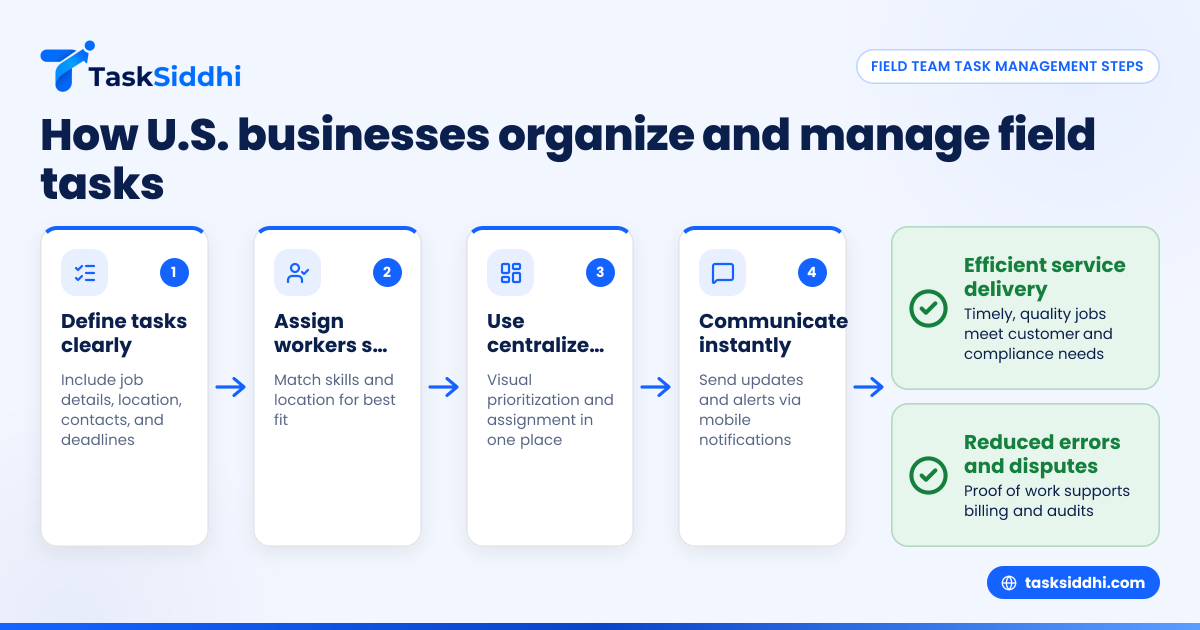
steps to organize field team tasks
- Define tasks clearly: Include job details, location, client contacts, and deadlines.
- Match skills and location: Assign workers closest to the site with the right expertise.
- Use centralized boards: Software like TaskSiddhi lets managers prioritize and assign tasks visually.
- Communicate instantly: Send alerts for changes or cancellations via mobile notifications.
- Track progress: Field workers update jobs on mobile apps for real-time monitoring.
common pitfalls in task assignment
- Overloading workers leading to burnout.
- Ignoring skill requirements causing poor service quality.
- Using manual updates that delay communication.
Digital solutions reduce these issues with organized, automated workflows.
why is proof of work and compliance important for U.S. field teams?
Proof of work provides evidence that tasks were completed correctly and on time. This improves trust with clients, meets safety and regulatory requirements, and supports billing accuracy.
For example, an electrician in Detroit must comply with city codes and provide digital proof of inspection work. Photos, timestamps, and signatures attached to job records are key during audits or customer disputes.
how do field teams prove site work efficiently?
Field teams use mobile apps to capture timestamps, photos, and customer signatures right on site. These digital records are securely stored and linked to each job for easy reference.
For example, a pest control technician in Houston can photograph the treated area, record job completion time, and get the client's digital approval—all through a mobile app.
what is the role of an AI field team in task management?
AI field team tools use artificial intelligence to automate scheduling, detect job anomalies, and send reminders, improving accuracy and saving time.
AI recommends the best technician based on skills and location, flags unusual job data for review, and nudges workers about deadlines and compliance.
what benefits does AI bring to field team task management?
AI improves efficiency by automating routine choices and highlighting issues early. This leads to faster job completion, fewer errors, and better resource use.
However, AI needs good data to work well and teams must adapt gradually to trust its suggestions. Some AI features may come at extra cost, so consider your business needs.
how can time tracking enhance field team productivity and payroll in the U.S.?
Accurate time tracking records hours worked for payroll and billing compliance. GPS-enabled clock-ins confirm workers’ presence at job sites, reducing errors and payroll fraud.
Linking time logs to software like QuickBooks helps automate wage calculations and invoicing.
steps for effective time tracking
- Use GPS clock-in/out to verify location.
- Require start and finish updates per job.
- Sync data with payroll systems.
- Monitor for anomalies like early clock-outs.
example
A Houston pest control firm uses TaskSiddhi’s time tracking. When a technician clocks out early without completing jobs, supervisors review photo proof before approving payroll.
what are best practices to improve communication between field teams and the office?
Clear communication decreases errors and delays. Provide mobile access to job details, enable instant notifications, and require regular status updates via the mobile app.
Hold routine check-ins and use reporting tools for management visibility.
communication tips
- Standardize update protocols (e.g., report job start, midpoint, and completion).
- Use task management as the central communication platform.
- Train leaders to escalate issues quickly through the app.
Avoid relying solely on chats that can create confusion and lost information.
how do reporting tools support better management for field teams?
Reports summarize job status, delays, time spent, and expenses—helping managers spot bottlenecks and ensure compliance.
Customizable exports integrate with ERP and accounting software like QuickBooks, streamlining operations.
useful report examples
- Daily job completion rate
- Technician time logs
- Material and travel expenses
- Compliance audit trails
how to choose the right field team task management solution for your U.S. business
Consider your size, industry, and needs when selecting software. Features to prioritize:
- Mobile-first design for field workers
- Proof of work tools like photos and signatures
- Integration with QuickBooks or Stripe
- AI features for automation and alerts
- Compliance support for U.S. labor and safety laws
- Simple interfaces suitable for all skill levels
evaluating software
- Test demos or free trials on field devices.
- Assign jobs, update status, add proof, and run reports.
- Check customer support quality.
- Compare features and pricing; view free vs paid options.
Gradual adoption eases transition and boosts success.
See how field team task management works on our product tour. Compare plans and select the best fit on our pricing page.
frequently asked questions
what types of field team jobs can benefit from task management software?
Any onsite work like HVAC repair, landscaping, pest control, construction, or equipment maintenance benefits. Real-time tracking and scheduling improve efficiency and client satisfaction.
is AI field team technology expensive or complex to use?
Not always. Many solutions embed AI that works quietly in the background to help with scheduling and alerts. Users enjoy simpler management without complex setups.
how does digital proof reduce client disputes?
Photos, signatures, and timestamps provide clear evidence the job was done properly and on time, reducing misunderstandings and billing conflicts.
can field teams work offline and still update jobs?
Yes, many apps allow offline updates that sync once connectivity returns, allowing workers to capture proof even in low-signal areas.
how does field team management software support U.S. labor law compliance?
By tracking working hours, documenting visits, and keeping audit trails, software helps meet wage, safety, and record-keeping laws including OSHA regulations.
why is mobile access crucial for field teams?
Mobile access gives field workers instant job details, update capability, and communication tools on the go, increasing productivity and reducing delays or errors.