














Paper job cards can slow down small field teams with lost information and manual errors. Job card software streamlines job tracking, reporting, and communication digitally, saving time and improving accuracy for US businesses.
Key takeaways
- Digital job card software replaces paper cards with mobile and desktop tools.
- It improves task tracking, proof collection, and real-time team updates.
- AI job card features help automate data entry and optimize scheduling.
- Mobile apps enable field teams to capture photos, signatures, and notes onsite.
- Integration with QuickBooks and Stripe supports streamlined billing.
- TaskSiddhi offers specialized features for US field service and client work teams.
Why replace paper job cards with digital software?
Paper job cards are common in small US field teams but come with drawbacks. They can get lost, illegible, or delayed in communication. Paper slips require manual data entry, doubling administrative effort and increasing errors. This slows down invoicing, reporting, and overall job completion.
In contrast, job card software digitizes all job details and updates immediately as teams work. This means faster approvals and quicker client billing, which is crucial for cash flow in small businesses in cities like Chicago or Houston. Digital job cards also build accurate records for audits and tax filings.
How does AI job card software improve field service efficiency?
AI job card software automates routine tasks and enhances decision-making by analyzing job data.
AI features reduce manual entry by auto-filling details from past jobs or customer profiles. They can suggest the best team members for tasks based on skills and availability, which helps optimize scheduling. For dispatchers in Detroit or elsewhere, this means fewer scheduling conflicts and faster job assignment. By spotting patterns in delays or recurring issues, AI tools support process improvements.
Using AI thus saves managers time and helps small teams deliver consistent service quality with fewer errors.
How can a small field team switch from paper to digital job cards?
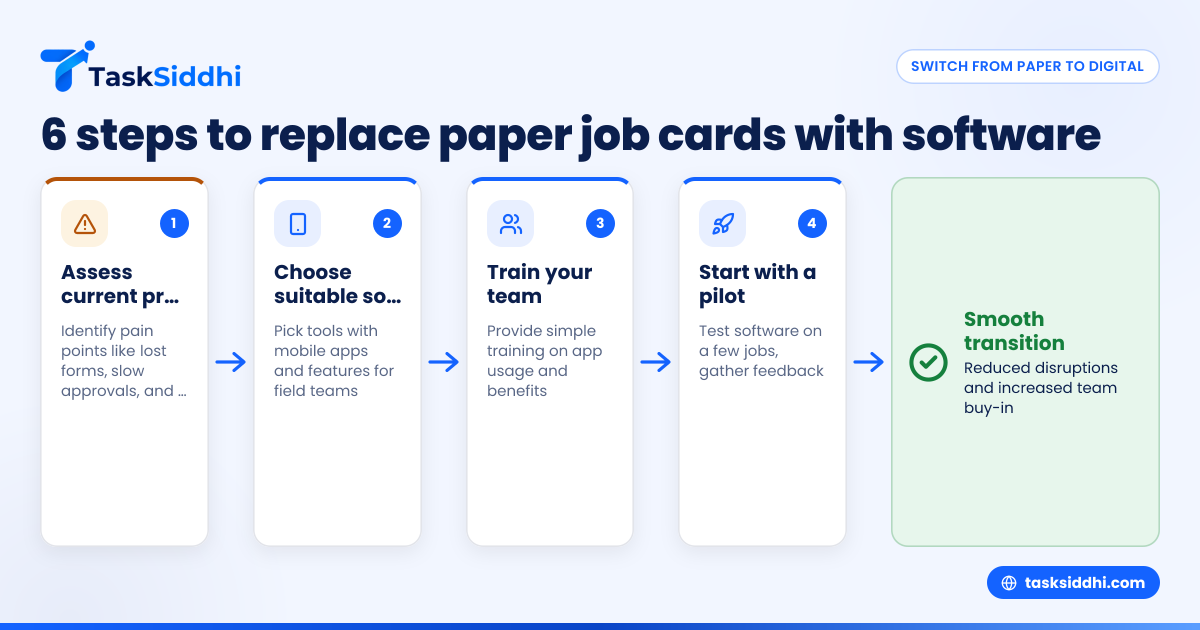
Switching to digital job card software requires a clear plan and step-by-step rollout:
- Assess your current process: Identify key pain points with paper cards—lost forms, slow approvals, or messy tracking.
- Choose suitable software: Look for tools tailored for field teams handling service or client jobs, which offer mobile apps for onsite data capture.
- Train your team: Provide simple training on app usage and the benefits of digital cards.
- Start with a pilot: Implement the software on a few jobs to gather feedback and fix issues.
- Gradually expand use: Move all teams to the system as they get comfortable.
- Integrate with accounting systems: Link job card data with QuickBooks or Stripe for easier invoicing.
This approach reduces disruptions and gets buy-in from field workers who often resist new technology.
What are the must-have features of job card software for US small businesses?
In the United States, certain features make job card software effective for small field teams:
- Mobile app access for onsite updates including photos, signatures, and site visit proofs.
- Real-time syncing so managers and clients see job progress instantly.
- Time tracking to accurately record work hours for payroll or client billing.
- Customizable job templates that reflect your service types and regulatory requirements.
- Automation workflows for reminders, approvals, and follow-ups.
- Reporting tools for job status, employee productivity, and tax documentation.
- Integration capabilities with QuickBooks for accounting and with Stripe for payments.
- User roles and permissions to control access securely.
These functionalities reduce paperwork and errors for teams handling everything from HVAC repairs in Houston to consulting jobs in Chicago.
How does digital job card software help with compliance and proof collection?
Digital job cards centralize all job-related data, including photos, customer signatures, and notes. This creates a verifiable work history for each job. For US teams, this is valuable to defend against disputes or comply with contractual obligations.
For example, service technicians can upload photos of completed repairs or site conditions immediately. Managers can digitally sign off jobs remotely, speeding approvals and avoiding lost paper forms.
Moreover, capturing timestamps and GPS locations with each update supports accuracy in time tracking and route logs. This documentation can be vital for tax audits or insurance claims, aligning with standard business practices in cities like Detroit or Houston.
Can job card software handle billing and payments?
Yes. Job card software often includes or integrates with billing and payment systems common in the US market. By linking detailed job data to invoicing software like QuickBooks, the time from job completion to invoice creation shortens substantially.
Payments can be tracked via Stripe integrations, giving clients convenient online payment options tied directly to job status. This eliminates manual bookkeeping duplications and reduces billing errors, improving cash flow.
For example, a small HVAC company in Chicago can generate invoices with line-item job details and automate follow-ups on unpaid balances through software workflows.
How do mobile apps improve field team productivity?
Mobile apps empower field teams by providing instant access to job details and tools anywhere. Workers can capture site photos, get client signatures, update job status, and enter time worked while still onsite.
This reduces trips back to the office just to submit paperwork. It also minimizes miscommunication since all updates sync immediately to managers and dispatchers.
In tough environments, such as busy Chicago streets or remote Detroit locations, a field-friendly mobile interface reduces friction and speeds up work completion. Notifications on smartphones keep teams aware of schedule changes or urgent requests without delay.
Mobile apps are essential to modern field work’s fast pace and customer expectations.
What should US small businesses look for when choosing job card software?
When selecting job card software, US small businesses should consider:
- Ease of use: The user interface should be simple for non-technical field workers.
- Mobile functionality: Native iOS and Android apps with offline modes are critical.
- Customization: Ability to tailor job types, fields, and workflows to business needs.
- Reporting and compliance: Accurate logs and exportable reports are essential for tax and audit readiness.
- Integration options: Compatibility with QuickBooks, Stripe, and other finance tools streamlines operations.
- Support and training: Vendor support should be responsive and offer clear onboarding.
- Security: Data access must be controlled with roles and permissions to protect sensitive client information.
TaskSiddhi covers all these aspects, making it a practical choice for small field teams managing jobs on the go.
How much does job card software cost for small field teams?
Job card software costs vary depending on features and team size. Many vendors use subscription models with prices based on the number of users or job cards processed.
Generally, expect to pay between $10 and $40 per user monthly for full-featured software with mobile apps, reporting, and integrations. Some providers offer free plans with limited capabilities or trials.
Comparing plans lets you balance budget with needed functionality. Cost savings come through reduced errors, fewer lost jobs, and faster invoicing, which quickly recovers investment.
See how job card software can streamline your field work
Switching from paper job cards saves time, reduces errors, and improves throughput for US small field teams. Digital job card software streamlines every step from onsite data capture to invoicing and reporting. Explore how TaskSiddhi’s specialized mobile app and automation can help your team run better jobs and get paid faster on our product tour or check which plan suits your needs best at pricing.
Frequently asked questions
What is job card software?
Job card software replaces paper job forms with digital tools on mobile and desktop. It tracks the details, time, and status of field jobs in real time. This helps teams work faster and more accurately.
How can AI job cards benefit my small business?
AI job cards assist by automatically filling data fields, suggesting schedules, and flagging delays. This reduces manual entry and helps managers optimize job assignments.
Is job card software easy for field teams to use?
Most job card software offers mobile apps designed with simple interfaces. Training is minimal, and many users find digital cards easier than paper, especially once they see faster approvals.
Can job card software integrate with QuickBooks?
Yes, many job card platforms integrate with QuickBooks to sync job data with accounting and invoicing. This reduces duplicate data entry and accelerates billing.
How do digital job cards improve job tracking?
Digital cards update in real time with timestamps and GPS. Managers and clients get immediate visibility into job status, reducing calls and misunderstandings.
Can I try job card software before committing?
Yes, vendors often provide free trials or limited free plans. Testing lets your team evaluate usability and fit before paying for a subscription.