














Field team task management involves organizing and coordinating work for employees working outside the office. Small service crews in the United States face unique challenges around scheduling, communication, and tracking progress, which can impact customer satisfaction and profitability.
Key takeaways
- Small field teams often struggle with real-time communication and updates while on site.
- Coordinating multiple tasks across different client locations requires clear job cards and reliable scheduling.
- Manual methods like paper slips, WhatsApp, and spreadsheets can lead to errors and delays.
- Mobile-friendly task boards and time tracking tools improve accountability and job completion rates.
- AI field team management solutions can help optimize routes and assign jobs efficiently.
- Compliance with US regulations like data privacy and labor laws is critical for successful task management.
What makes field team task management challenging for small service crews?
Small field teams typically handle tasks such as repairs, installations, inspections, or client visits in cities like Chicago and Houston. Unlike office-based staff, they work dispersed across many sites and need on-the-go coordination. Key challenges include:
Lack of real-time visibility
Managers can’t always see where workers are or if a job is on track. Without live status updates, delays or issues often surface too late.
Inefficient communication tools
Many teams still rely heavily on WhatsApp groups, phone calls, or paper job cards. These methods are time-consuming and prone to misunderstandings.
Scheduling complexity
Small crews must juggle multiple jobs daily, often rescheduling based on new requests or cancellations. Without a centralized calendar that syncs with field data, plans break down.
Tracking and proof of work
Clients expect transparency about work progress and completion. Field staff must send proof such as photos, time stamps, and service notes — all recorded accurately.
Compliance and payroll challenges
Time tracking affects wages and costing. Careful logging of hours is needed for accurate payroll and compliance with labor laws.
How does AI field team software improve task management?
AI field team software provides smart automation to optimize scheduling, communication, and reporting.
Using algorithms, AI can assign jobs based on crew availability, skillsets, and proximity, reducing travel time and costs. It can monitor job progress in real-time, sending automated alerts about delays. With predictive analytics, AI forecasts workload peaks and suggests adjustments.
This enhances operational efficiency and customer satisfaction by minimizing idle time and speeding up resolution.
Improved job allocation
AI considers factors like weather, traffic, and crew efficiency to allocate tasks optimally. This dynamic scheduling is particularly useful for small crews juggling many short jobs daily.
Enhanced communication
AI-powered reminders and notifications keep field teams informed. Automated routing information and digital checklists ensure workers complete all steps.
Data-driven insights
Managers gain visibility into team performance with reports generated automatically. This helps identify bottlenecks or training needs.
What is a practical step-by-step process to streamline field team task management?
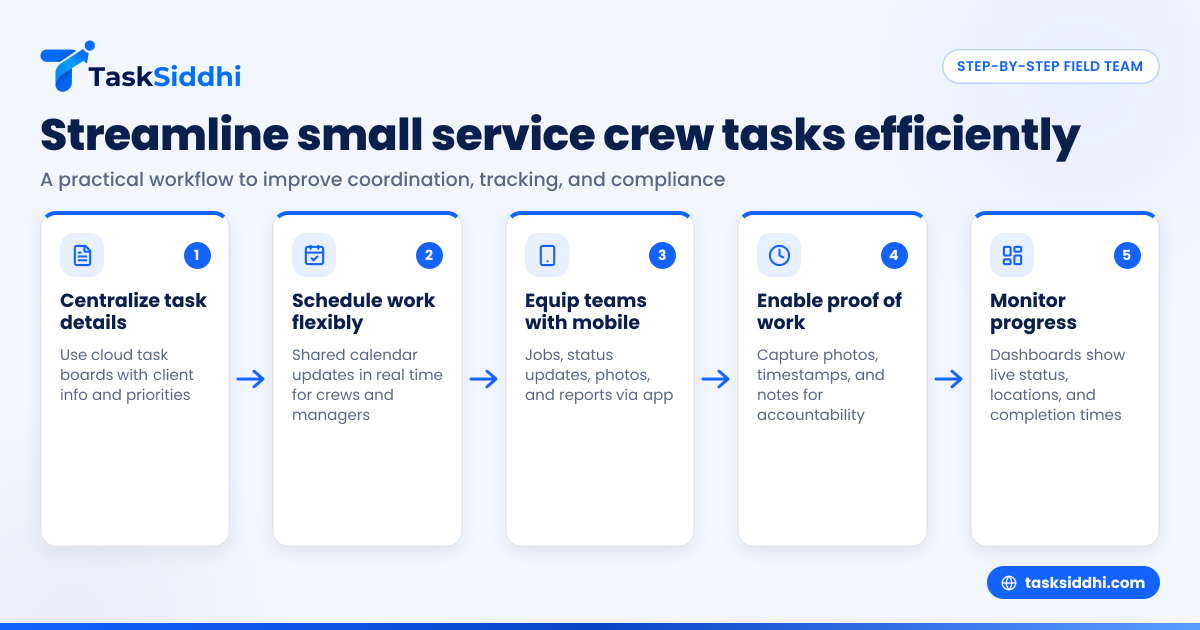
- Centralize task details
Use a cloud-based task board where every job card contains client info, scope, location, and priority. Avoid scattered notes or chats.
- Schedule work with flexibility
Develop a shared calendar visible to managers and crews that updates in real-time. Allow crews to request changes via mobile.
- Equip teams with mobile tools
Field workers should have a mobile app for receiving jobs, updating status, capturing images, and submitting reports.
- Enable proof of work collection
Require that staff take photos, enter start/end times, and add notes to each job. This builds accountability and satisfies client audit requests.
- Monitor progress continuously
Use dashboards that provide managers live job status, crew locations, and estimated completion times.
- Analyze data for improvements
Regularly review reports and worker feedback to optimize routes, task durations, and resource allocation.
How do US regulations influence field team management?
Operating a small service crew in the US involves adherence to several regulatory considerations.
Labor laws and wage compliance
Proper time tracking is crucial to comply with the Fair Labor Standards Act (FLSA), which governs overtime and minimum wages. Electronic records should capture hours worked accurately to avoid disputes and penalties.
Data privacy and communication rules
When sending marketing or job updates, teams must respect CAN-SPAM and TCPA laws. These regulate unsolicited calls, texts, and emails to protect consumer rights.
Tax and financial reporting requirements
Companies must manage revenue and contractor payments following IRS rules. When hiring 1099 subcontractors, clear documentation and reporting are necessary.
Using integrated task management apps helps centralize compliance data, reducing risks.
How do mobile apps help small teams in the field?
Mobile apps created for field team task management allow workers to:
- Instantly receive new assignments and updates
- Update job status and communicate with managers in real time
- Attach photos or proof directly from the site
- Log work hours automatically, which simplifies payroll
- Access client history and notes on the move
This reduces paperwork and errors from manual entry while speeding up client billing and reporting.
Why do manual tools like spreadsheets and WhatsApp fall short?
While popular due to simplicity, these manual tools lack integration and automation.
- Spreadsheets risk version conflicts and outdated data especially when multiple users edit.
- WhatsApp doesn’t offer structured job cards or proof collection features.
- Paper job slips can get lost and don’t provide live progress tracking.
This fragmentation causes delays, inaccurate records, and makes reporting difficult.
How to choose the right field team task management app?
Look for tools that offer:
- Easy-to-use digital boards designed for small teams
- Mobile apps with offline functionality for poor connectivity areas
- Time tracking and proof-of-work capture features
- Automated workflows and notifications
- Integration with accounting or CRM software used in US businesses
- Comprehensive reporting dashboards
Reading reviews and comparing plans helps find a solution aligned with your crew size and needs.
Conclusion
Small service crews in the United States face field team task management challenges around communication, scheduling, and compliance. Leveraging mobile apps and AI-enabled automation tools can significantly improve coordination, job completion speed, and customer satisfaction. Solutions that centralize tasks and provide real-time updates ease daily operational hurdles and support growth.
Explore the product tour or compare plans at pricing to see how efficient task management can transform your field work.
Frequently asked questions
What features are essential for small field team task management?
Essential features include digital task boards, mobile app access, time tracking, photo proof collection, real-time updates, and reporting. These help organize work clearly, reduce errors, and improve client transparency.
Can AI assist with scheduling field service jobs?
Yes, AI can optimize job assignments based on skills, locations, and time availability. This reduces travel time, balances workloads, and adapts dynamically to last-minute changes.
How does time tracking help US businesses comply with labor laws?
Accurate time tracking ensures companies pay overtime and wages correctly as per the Fair Labor Standards Act. Electronic records prevent disputes and facilitate payroll audits.
Are mobile apps secure for handling client and employee data?
Modern task management apps use encryption and secure login protocols aligned with US data privacy expectations. Always choose providers that maintain robust security practices.
How do I train my field staff to use new technology?
Start with simple onboarding sessions, use apps with intuitive interfaces, and provide support during initial days. Emphasize benefits like reduced paperwork and faster payments to encourage adoption.
Can task management apps integrate with accounting software like QuickBooks?
Many apps offer integration with QuickBooks and similar financial tools common in US businesses, enabling smooth invoicing and expense tracking from the same platform.