














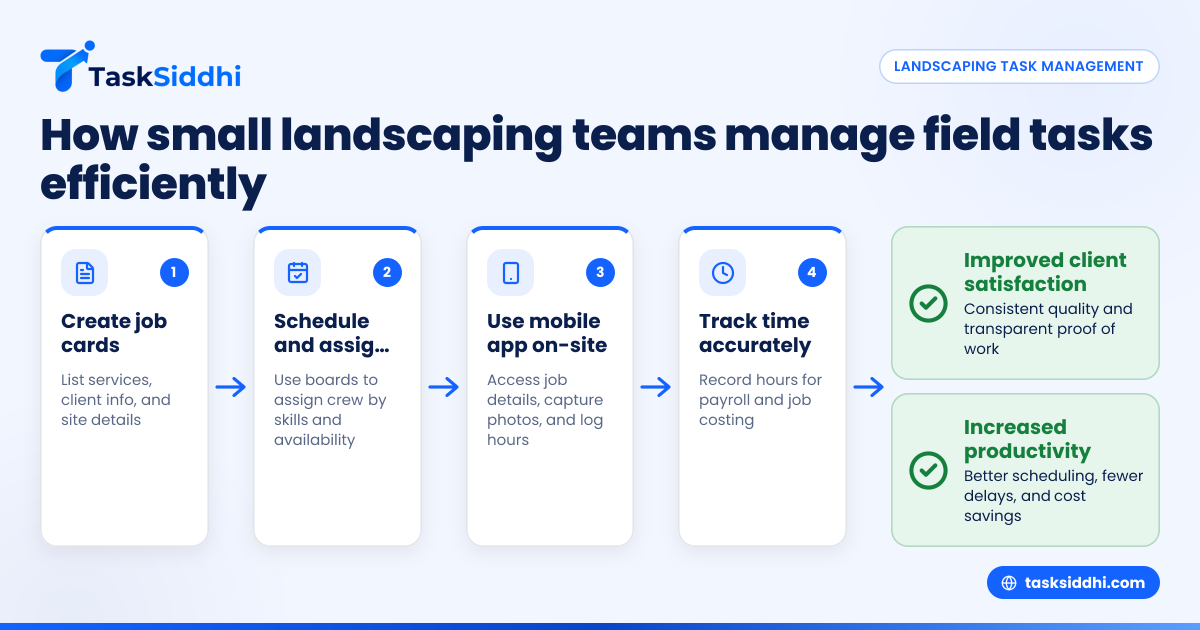
Field team task management in small US landscaping businesses means organizing and tracking work crews do on clients’ properties. It involves assigning tasks, scheduling site visits, capturing proof of work, and monitoring time to keep jobs on track and customers happy.
Key takeaways
- Clear task assignment and scheduling reduce confusion and delays for landscaping crews.
- Mobile apps help field teams get job details and deliver proof of work directly from sites.
- Time tracking on-site improves payroll accuracy and job costing for landscaping firms.
- Using job cards and boards organizes workflows and ensures all tasks are captured.
- Reporting helps identify bottlenecks and improve customer service and team productivity.
- AI field team tools can optimize routing and resource allocation for faster landscaping jobs.
Why does field team task management matter for landscaping businesses?
Managing a landscaping team in cities like Houston or Denver means coordinating multiple client jobs on different schedules. Without clear task management, workers can miss tasks, show up late, or forget customer preferences. This leads to unhappy clients and wasted time.
Small landscaping businesses often rely on WhatsApp groups or paper checklists, which can cause communication errors and lost job details. Field team task management replaces this chaos with structured workflows. It captures work done on-site with photos and notes, tracks hours for accurate billing, and provides managers real-time visibility of all active jobs.
Implementing effective task management helps landscaping businesses track job progress by property, assign workers to specific tasks like trimming or irrigation repairs, and monitor quality consistently. This improves customer satisfaction and creates repeat business.
How can I assign and schedule landscaping tasks efficiently?
You assign landscaping tasks by creating job cards for each client visit. Each job card lists the specific services required — like lawn mowing or flower bed maintenance — plus the address and customer contact. Then, scheduling assigns these jobs to team members on certain dates and times.
- Use a task board to list all active landscaping jobs.
- Break down each task into clear steps with due dates.
- Assign tasks to available crew members considering their skills.
- Confirm appointments with clients via phone or text before the visit.
- Adjust schedules immediately if jobs are delayed or canceled.
Tools that support boards and views make it easy to see daily assignments and deadlines at a glance. For example, in Detroit’s busy season, workers know exactly which site to visit next and what to do.
What does the mobile app do for landscaping field teams?
A mobile app delivers job details and last-minute updates directly to field crews’ phones. It lets workers mark tasks complete, capture site photos, record equipment used, and log time on-site.
This app prevents paperwork loss and improves communication. Crew leads in Chicago can quickly report issues or delays to managers. Mobile apps also support field visits with GPS and photo proof, streamlining billing and quality verification.
How does time tracking improve landscaping business operations?
Time tracking logs hours each worker spends on jobs. This supports payroll accuracy, job costing, and assessing productivity.
When crews clock in via mobile devices, managers get real-time reports without paper timesheets. This reduces errors and payroll disputes common with hourly workers.
Tracking time by task or site helps identify which jobs take longer and why. Businesses in Houston can then adjust pricing or staff allocation to avoid budget overruns. Integrating time tracking with task boards provides full workflow visibility and efficiency.
What are the benefits of automated task management in landscaping?
Automation handles repetitive tasks such as scheduling, notifications, and status updates. This cuts manual errors and frees managers to focus on growing the business.
For example, new client requests from email or web forms can create job cards automatically. Automated reminders prompt crews to start on time.
Alerts notify managers if visits are overdue or tasks incomplete past deadlines, avoiding missed appointments or quality lapses.
With automation, landscaping businesses maintain consistent, professional service while scaling operations.
How can AI field team capabilities optimize landscaping workflows?
AI field team technologies analyze historic job data to suggest optimal worker assignments and routes, reducing travel time and fuel costs.
AI predicts task durations—like edging or mulching—in various neighborhood types, helping managers allocate appropriate time. It flags potential scheduling conflicts early.
Small landscaping companies in cities like Chicago benefit as AI streamlines daily plans, avoids downtime, and maximizes billable hours.
While still evolving, adopting AI field team tools provides a competitive edge by improving productivity and cutting costs.
How do I choose the right task management system for my landscaping business?
Choose a platform designed for field teams with mobile access, photo capture, time tracking, and customizable job boards. It should integrate easily with tools like QuickBooks for billing.
It must simplify communication, scheduling, and reporting without extra paperwork or spreadsheets. Viewing all tasks and statuses in one place saves time.
Look for flexible solutions supporting service jobs and client work, so you can grow your landscaping business efficiently.
What are the first steps to implement task management effectively?
Start by mapping all routine landscaping tasks and client workflows. Then select a task management tool with mobile and reporting features.
Train your crew on the app for daily updates and proof capture. Begin digitizing current jobs and scheduling through the system.
Finally, monitor data from reporting and adjust your processes gradually. This helps your landscaping business respond faster and handle more jobs with the same crew size.
Try a hands-on experience of streamlined landscaping task management with our product tour or compare plan options designed for small field teams at pricing.
Frequently asked questions
What features are essential in field team task management software?
Essential features include task assignment boards, scheduling, mobile access with photo capture, time tracking, and automated alerts. Reporting and billing integration are also important for small landscaping businesses.
Can small landscaping businesses afford task management tools?
Yes, many offer scalable pricing for teams of 5 to 30. Investing in task management typically saves time and cuts costly errors, improving profits.
How does proof of work help improve client relations?
Proof of work—like photos taken via the mobile app—confirms a job was done properly and on time. This transparency builds trust and resolves disputes quickly.
What is the best way to train my landscaping crew on new software?
Start with simple features your crew will use daily, such as task completion and photo uploads. Provide hands-on demos and allow time for adjustment. Support helps ensure smooth adoption.
Does task management software support compliance with US labor laws?
Yes, good systems track employee hours precisely, aiding compliance with overtime and payroll regulations. They provide documentation needed for tax filings and audits.
How soon will my landscaping business see benefits after adopting task management?
Many notice time savings and fewer errors within weeks. Scheduling and communication improve quickly. Reporting insights take longer but guide ongoing efficiency gains.