














Small agencies in the United States can streamline client work management using task boards that visually organize, assign, and track projects. Task boards reduce reliance on WhatsApp groups, spreadsheets, or paper, helping agencies run smoother operations, monitor time spent, and improve client satisfaction.
Key takeaways
- Task boards simplify collaboration and communication for small agencies handling client work.
- Visual job cards and status columns help track progress and deadlines clearly.
- Time tracking and reporting on task boards improve billing accuracy and project insights.
- Mobile apps enable team members to update status and upload proof on site or remotely.
- Automation features reduce repetitive work like notifications and follow-ups.
- Integrating ai client work tools enhances productivity by automating routine tasks.
Why small agencies need better client work management
Small agencies often manage multiple clients, each with unique requests, deadlines, and teams involved. Many rely on informal methods such as WhatsApp chats or Excel sheets to track this work. These approaches cause delays, missed deadlines, and lost information.
Using a dedicated client work management tool helps agencies organize all tasks in one place, assign responsibilities clearly, and monitor progress without endless back-and-forth. The outcome is timely delivery, better resource use, and happier clients.
What is a task board and how does it help?
A task board visually organizes client projects using columns and cards. Each card represents a job or task, and columns show stages such as “To Do,” “In Progress,” and “Completed.”
This setup allows managers and teams to:
- See work volume and status at a glance
- Assign tasks to specific workers
- Prioritize urgent jobs
- Upload necessary documents or site visit photos
- Track time spent on each task
Task boards replace scattered emails and spreadsheets with a unified, transparent workflow. For client work management small agency owners gain control and reduce errors.
How does ai client work improve task boards?
AI client work features use intelligent automation to help small agencies manage tasks more efficiently. They prioritize urgent jobs, suggest next steps, automate reminders, and extract data to speed reporting. This reduces manual work and keeps projects on track.
With AI-enhanced task boards, agencies save time and improve project accuracy without additional effort.
How do you set up a task board for client work management?
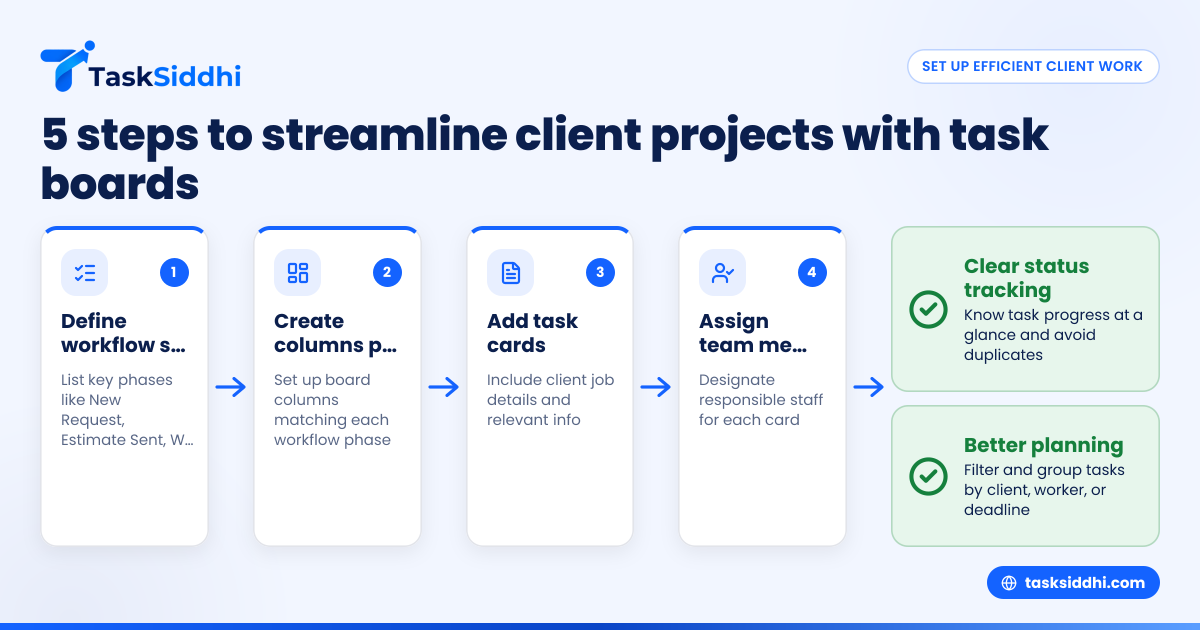
Here’s a simple 5-step approach for small agencies in cities like Chicago or Houston:
- Define the workflow: List key stages your jobs go through, such as “New Request,” “Estimate Sent,” “Work In Progress,” “Quality Check,” and “Delivered.”
- Create columns on your board for each stage.
- Add cards for each client job, including job details and client info.
- Assign team members to cards responsible for the work.
- Use tags or labels to mark priority, type of service, or deadline.
This setup clarifies status tracking and avoids duplicate work. Tools with boards and views also let you filter or group cards by client, worker, or deadline for better planning.
How do ai client work tools help automate routine tasks?
AI client work tools automate routine tasks by identifying patterns and setting reminders. They can schedule follow-ups, extract data from photos or documents, and suggest task reallocations. This automation keeps workflows smooth and reduces human error.
Agencies can focus more on delivering work and less on administrative overhead thanks to these AI features.
How can small agencies track time effectively on client projects?
Tracking time spent on each task helps with accurate billing and understanding team capacity. A best practice is to use a tool that offers easy time tracking integrated into the task board.
Employees start and stop timers while working on specific job cards via desktop or mobile apps. Managers get reports showing total hours per client project and can compare with budgets.
For example, a small Detroit marketing agency can avoid undercharging or overbooking by reviewing timesheets regularly. It also helps handle 1099 contractor billing and verify on-site visits with proof photos.
What automation tasks can save time for small agencies?
Some repetitive activities that automation can streamline are:
- Sending reminders to clients about pending approvals or payments
- Notifying staff automatically when tasks change status or new jobs arrive
- Generating standard emails, invoices, or reports from task data
- Updating deadlines based on client feedback or unforeseen delays
Using workflow automation reduces manual follow-up and keeps client projects moving smoothly without constant oversight.
Can a mobile app improve client work for field staff?
Yes, a mobile app allows team members working on-site or remotely to:
- Update task statuses in real time
- Capture and upload site visit photos or work proofs
- Log time without returning to the office
- Communicate via app comments linked to jobs
This capability is critical for small agencies in sectors like event management, home services, or construction. Mobile access keeps all client work visible and documented, improving accountability.
How do task boards integrate with accounting and finance tools?
Small agencies often use QuickBooks for invoices and Stripe for payments. Task board platforms can integrate or export data to these systems, ensuring:
- Accurate invoicing based on tracked time and completed jobs
- Streamlined client billing and payment follow-up
- Maintaining records for tax and compliance purposes
This integrated approach avoids errors and saves time by eliminating double entry.
Can task boards handle compliance for client outreach?
Agencies conducting marketing campaigns or client outreach must comply with laws like CAN-SPAM and TCPA. Task boards can help by:
- Tracking client consent status and opt-outs
- Scheduling outreach with rules to avoid calling or emailing restricted contacts
- Documenting communication history for audits
While a task board won’t replace specialized compliance software, thoughtful task and data management support regulatory adherence.
How to get started with task boards for client work management small agency owners will find it easiest?
Start with a free or trial version offering essential features like task cards, boards, and basic time tracking. Gradually add more users, try automation, and use the reporting dashboard to measure productivity.
Encourage your team to update their statuses regularly and document proof of work especially for on-site visits. Over time, this disciplined approach reduces errors and improves client satisfaction.
See how it works and choose your plan
If you want to streamline client work management for your small agency, discover how TaskSiddhi’s platform supports hands-on teams with job cards, site visit proof, time tracking, and reporting. Take a product tour and compare plans at pricing to find the best fit.
Frequently asked questions
What makes task boards better than spreadsheets for client work?
Task boards provide visual, real-time status updates for each job, while spreadsheets require manual editing and lack instant collaboration. Boards reduce errors, missed deadlines, and improve team communication.
How can small agencies manage remote client work with task boards?
Task boards accessible via mobile apps enable team members to update jobs, upload proofs, and communicate from anywhere. This keeps client projects coordinated even when staff is dispersed.
Is time tracking necessary for small agencies?
Yes, it helps with accurate client billing, verifying work hours, and understanding team workloads. Integrated time tracking on task boards is simple and saves administrative time.
Can automation replace manual follow-ups?
Automation can handle routine notifications and reminders but oversight is still required for complex client requests. It frees staff to focus on priority work.
How does TaskSiddhi address security for client work data?
TaskSiddhi uses secure cloud storage, access controls, and encrypted connections to safeguard client projects and team information. This builds trust with clients and protects sensitive details.
Can I use task boards to track multiple clients on different projects?
Definitely. You can create boards or use filters for each client, assign distinct teams, and track deadlines separately, all within one platform.