














Managing client work for a small agency in the US is best done using dedicated client work management tools rather than spreadsheets. These apps simplify project tracking, task assignments, approvals, and progress monitoring, improving accuracy and team coordination.
Key takeaways
- Spreadsheets cause errors and delays for US small agencies managing client projects.
- Client work management tools streamline communication, approvals, and task tracking.
- Automated workflows and mobile apps improve team coordination and site visits.
- AI client work features speed up routine tasks and enhance reporting.
- Choosing the right system maintains clear client records and billing accuracy.
What are common challenges in client work management for small US agencies?
Common issues include manual data entry errors, lack of visibility on approvals causing delays, difficulty tracking fieldwork without mobile tools, scattered communication, inaccurate time tracking affecting billing, and limited reporting for performance analysis.
These challenges often result from relying on spreadsheets and disjointed communication channels like emails or phone calls. Client work management software centralizes tasks, approvals, and documentation, improving workflow clarity and time management.
How does AI client work technology improve project management?
AI client work capabilities automate repetitive tasks such as organizing job cards and flagging overdue approvals. They analyze past project data to predict delays and suggest task priorities, helping agencies allocate resources efficiently and keep projects on schedule.
For example, a Houston marketing agency can use AI-driven timelines to streamline campaign approvals, reducing manual follow-ups and ensuring deadlines are met without extra effort.
How to transition from spreadsheets to a client work management system in 5 steps
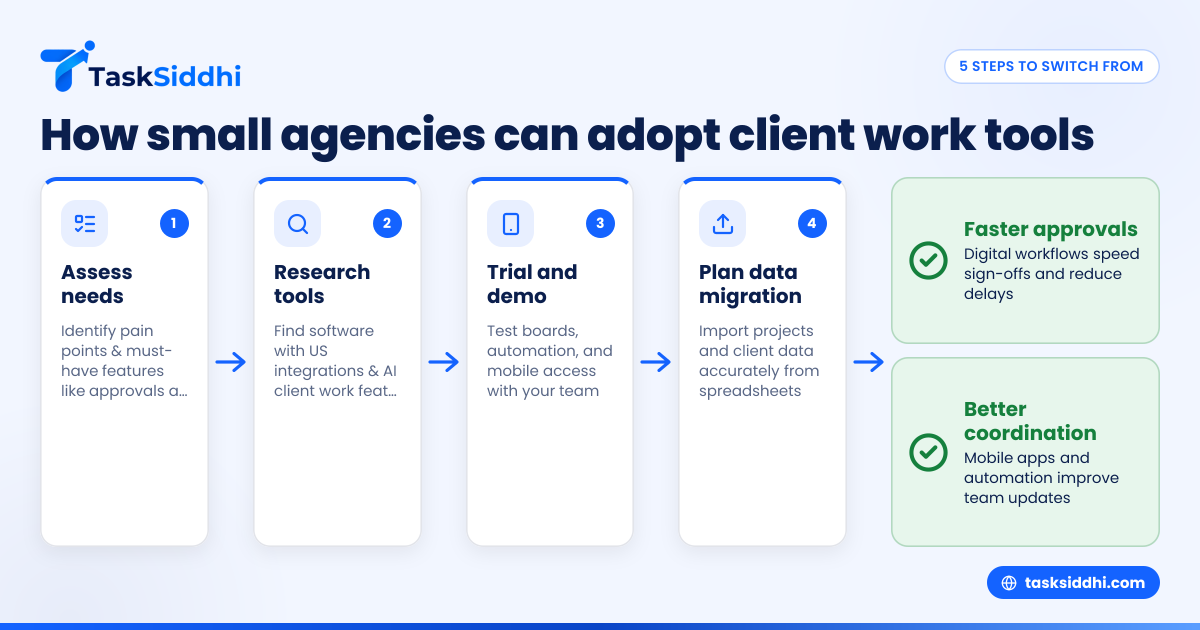
Switching to a client work management system involves assessing your team’s needs, researching tools suited for US small agencies, testing with trials or demos, planning data migration carefully, and training your team for smooth adoption.
A well-planned transition ensures your team quickly adapts and benefits from enhanced task tracking, approvals, mobile access, and integrations with common US accounting tools like QuickBooks or Stripe.
1. assess needs
Identify pain points in current workflows and list must-have features such as approval tracking, mobile support, and time logging.
2. research tools
Find software designed for small agencies with relevant US integrations and AI client work features.
3. trial and demo
Invite team members to test tools, focusing on boards and views, automation, and mobile functionality.
4. plan data migration
Import client and project data from spreadsheets, ensuring accuracy and completeness.
5. train and roll out
Provide training sessions and encourage regular updates to maximize system benefits.
What features should small client agencies look for in work management software?
Small agencies need tools with visual task boards, digital approval tracking, mobile app access for field work, accurate time tracking, automation for reminders, insightful reporting, and integrations with QuickBooks or Stripe.
These features help replace tedious manual tracking and speed up approvals. Mobile apps allow onsite updates and client signatures. Automation reduces follow-up emails while integrated reporting improves financial accuracy and performance reviews.
Why spreadsheets are not enough for client work management in small agencies
Though familiar, spreadsheets don’t scale well when juggling multiple projects with deadlines and approvals. They lack automatic notifications, real-time updates, and easy ways to attach photos or signed documents from client visits.
Using spreadsheets leads to missed deadlines, repeated manual updates, and inefficient communication. For example, a Detroit creative agency with dozens of projects risk losing client approvals without timely follow-up, harming client satisfaction and revenue.
How does the best client work management software help small agencies?
Purpose-built tools centralize project info, enabling task assignments and deadline setting, with mobile updates during site visits. Automated alerts reduce approval delays and time tracking supports billing accuracy.
AI client work features add intelligence by analyzing past projects to suggest task order and identify risks. Integration with finance tools like QuickBooks streamlines invoicing and payment collection.
How does client data security factor into choosing a management tool?
Keeping client data safe is crucial. Choose software with encrypted data storage, role-based access controls, and compliance with US data protection practices. This reassures clients about confidentiality of contracts and payment details.
Will using client work management software affect billing and taxes?
Yes. Linking time tracking to client projects improves invoice accuracy and provides detailed records for tax filings. Integration with QuickBooks or Stripe simplifies payment processing and expense tracking.
Can AI client work tools replace human judgment in project decisions?
No. AI assists by automating routine tasks and flagging issues but managers retain decision-making authority for priorities, resource allocation, and approvals.
How do client work management tools support mobile teams and field visits?
Mobile apps enable field staff to update job status, upload photos as proof, and collect digital client signatures instantly. This real-time data speeds approval cycles and reduces paperwork.
How expensive is it to adopt a client work management system?
Costs usually involve a monthly per-user fee, often less than lost time from managing spreadsheets manually. Free plans cover basics, while paid options unlock automation, advanced reporting, and mobile features.
How do I compare free vs paid plans when selecting a tool?
Free plans suit solo users or very small teams needing basic tracking. Paid plans offer features critical for agency growth like automation, mobile app access, and deeper reporting. Match these to your current needs before upgrading.
How to get client buy-in for a new management system
Explain improved approval speed, clearer communication, and less email clutter. Offer easy digital approval options and emphasize enhanced professionalism and data security.
Why small US client work agencies should move beyond spreadsheets now
Competitive markets in cities like Chicago or Detroit need speed and accuracy. Spreadsheets slow workflows and increase errors. Dedicated management tools improve visibility, accelerate approvals, and boost client satisfaction, letting your team focus on delivering quality work.
Explore how TaskSiddhi’s client work features, combined with boards and views, time tracking, and mobile app support field teams and approvals. See the product tour or compare plans at pricing.
Frequently asked questions
What is client work management for small agencies?
Client work management organizes projects, tasks, approvals, and communication to improve visibility, speed up deliverables, and reduce errors.
Can AI help with managing client projects?
AI automates routine tracking, predicts delays, and suggests work prioritization, supporting managers’ decisions without replacing them.
How do I track approvals without spreadsheets?
A client work management tool offers digital approval workflows, automatic reminders, and timestamped sign-offs for better control over project status.
Is mobile app support important for small agencies?
Yes, mobile apps let onsite or remote teams update tasks, upload proof photos, and collect client signatures instantly, speeding approvals.
How does better client work management improve billing?
Linking time tracking to projects produces accurate invoices and reduces billing disputes by documenting actual completed work.
Can I use TaskSiddhi’s free plan for client work management?
Yes, the free plan covers basic task management. Paid plans add automation, reporting, and mobile app capabilities essential for growing teams.