














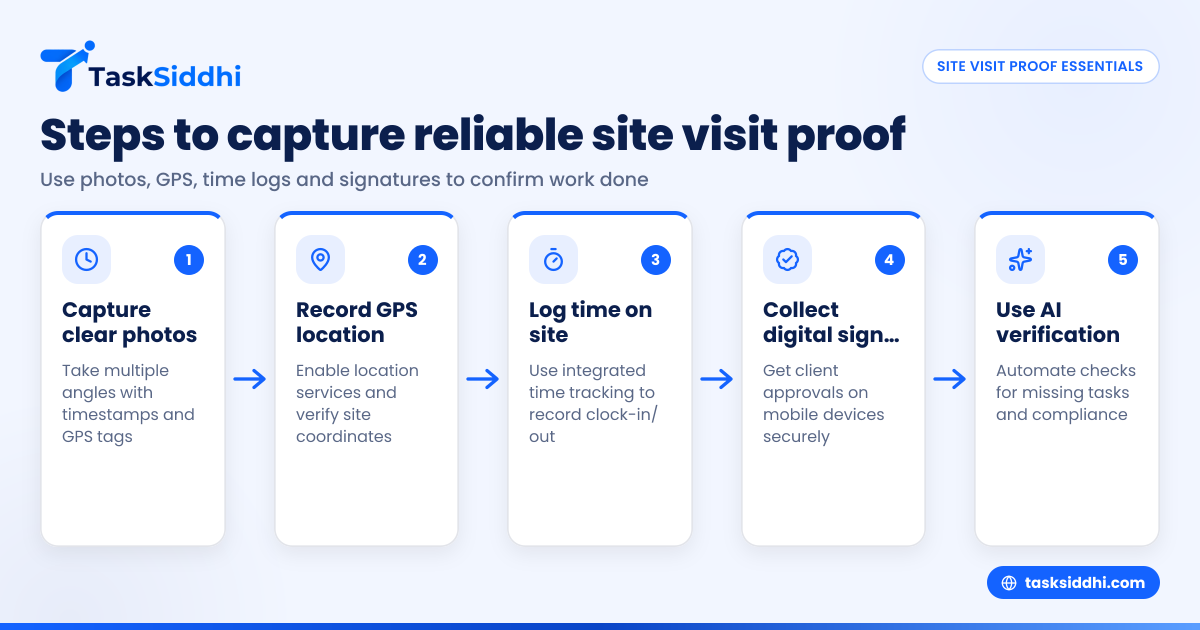
Creating reliable site visit proof is essential for US field teams to confirm work was completed accurately and on time. Key elements include photos, timestamps, GPS locations, and client signatures. Combining these with easy-to-use digital tools helps reduce disputes and improves reporting.
Key takeaways
- Site visit proof should include clear photos, GPS location data, accurate time logs, and customer signatures.
- Mobile apps can simplify capturing and organizing proof in real time.
- GPS stamping and time tracking help verify that visits occurred as planned.
- Digital signatures are faster and more secure than paper ones.
- AI site visit tools enhance quality control by detecting missed tasks or inconsistencies automatically.
- Integrated reporting consolidates all proof for easier billing and compliance.
Why is site visit proof important for US field teams?
Site visit proof is crucial because it provides clear evidence that work was performed as agreed. It reduces disputes with clients and supports billing accuracy, especially important for US businesses dealing with compliance, contracts, and tax reporting.
In cities like Chicago and Houston, showing proof of site visits prevents payment delays or legal issues by confirming a technician’s presence. Good documentation also supports platforms like QuickBooks and Stripe, linking work done to invoiced amounts.
Furthermore, site visit proof aids management in verifying employee attendance and work quality, critical for teams with 1099 contractors needing precise time and task records.
What are the best practices for capturing site visit photos?
High-quality site visit photos form the backbone of proof that a job was performed correctly and at the right location. Here are practical, field-tested tips to help US teams capture effective photographic evidence:
- Use a dedicated mobile app or camera: Smartphones are ubiquitous, but using a standalone camera risks losing timestamps and location data. Instead, employ a work-management app like TaskSiddhi that automatically tags photos with time and GPS coordinates securely. This keeps all records organized and accessible.
- Capture multiple angles: Take at least three photos showing the overall site, close-ups of the work area, and any before-and-after images to illustrate the job’s impact. For example, a tree-trimming crew in Detroit should photograph the overgrown branches, the tools used, and the cleared site.
- Include reference objects: Place easily identifiable items like tool handles, job order sheets, or employee ID badges in photos. This helps verify authenticity and the timeframe. For example, a plumbing technician in Chicago can place the job ticket on the counter next to a fixed pipe.
- Ensure good lighting and focus: Avoid blurry or dark photos, which can lead to disputes. If possible, use the app’s flashlight feature or schedule jobs during daylight. Clear images prevent misunderstandings about the job’s outcome.
- Timestamp and geotag photos: Verify that every photo stores metadata recording when and where it was snapped. This makes your proof robust against challenge, especially for audits or client questions.
Avoid common pitfalls like photographing irrelevant areas, neglecting metadata, or relying on verbal reports. For field teams servicing wide areas—from rural Texas to urban New York—consistent photo proof is invaluable.
How do I capture reliable GPS location during site visits?
GPS location confirms a technician’s physical presence at the client’s site, which supports billing and contract compliance. Reliable GPS stamping reduces risks of dispute and improves timesheet accuracy.
Steps to capture and verify GPS location effectively:
- Enable location services: Instruct your team to turn on GPS/location settings on their mobile devices before leaving for the site.
- Use an integrated mobile app: Select a work-management app that records GPS automatically when your team takes photos, adds notes, or submits job updates. This automation avoids missing or falsified data.
- Verify coordinates match client addresses: After collection, cross-check GPS points to ensure they fall within the client’s physical site boundaries. Many apps display maps for quick verification.
- Avoid manual location entry: Manual input may lead to errors or intentional falsifications and should be eliminated from your workflow.
- Handle weak signal areas: For sites with poor GPS connectivity—such as basements or remote rural sites—capture GPS coordinates both before arrival and immediately after leaving the location. Some apps support offline data caching and upload once the device reconnects.
For example, a cable installation team in suburban Detroit can assure clients of timely service and accurate billing by proving their fieldworkers were onsite exactly as logged.
Proper GPS data combined with detailed timestamping enhances the reliability of timesheets and strengthens your defense in cases involving IRS scrutiny or client audits.
Can digital signatures replace paper signatures for approvals?
Digital signatures are increasingly common and legally valid in the US, offering an efficient way to collect client approvals during site visits. Compared to paper forms, digital signatures are faster to obtain, more secure, and easier to store.
Benefits of using digital signatures include:
- On-site signing on a mobile device: Clients can approve work completion immediately on a technician’s smartphone or tablet screen, speeding up job closure.
- Automatic storage and linking: Digital signatures are saved with job records and proofs, reducing loss or damage associated with physical forms.
- Legal validity: Electronic signatures comply with the ESIGN Act and the Uniform Electronic Transactions Act (UETA), making them acceptable evidence for contracts and approvals across states.
- Easier retrieval: When billing or auditing, electronic signatures can be quickly searched and referenced, unlike paper forms stored in filing cabinets.
In busy markets such as Detroit or Houston, many clients prefer digital approvals because they eliminate handling paperwork and minimize contact. Remote digital signing options also let clients approve jobs post-visit safely and conveniently, maintaining workflow momentum.
To implement this, train your technicians to request signatures via mobile interfaces and verify client identity on site. This reduces signature disputes and accelerates invoicing.
How can AI site visit tools improve site visit proof?
AI enhances site visit proof by automating quality control checks and spotting missing steps or errors that might be missed manually.
AI site visit tools detect issues automatically
They scan photos for missing safety gear, verify if all tasks were completed per checklists, and flag anomalies in timing or locations. This reduces compliance risks and improves job accuracy.
For instance, a utility service in Chicago uses AI-powered tools to detect photos without proper PPE before report submission. This early detection helps maintain high standards and prevents billing disputes.
Using AI site visit features in tools like TaskSiddhi helps managers take prompt corrective action, raising quality and client trust.
How do integrated time tracking and reporting support site visit proof?
Integrated time tracking with GPS location verifies when and where work was performed, adding credibility to site visit proof. This simplifies billing, payroll, and compliance with contractor laws.
How to use integrated time tracking effectively
Record clock-in and clock-out times directly on mobile devices linked to assigned jobs. Timesheets are location-stamped to confirm presence at the correct site. Combining this data with photos and signatures creates a complete job record. Managers can generate reports consolidating all proof for billing and audits.
For example, an electrical repair business in Houston uses integrated time tracking to meet strict government contract audit standards. This system minimizes time fraud, speeds payments, and ensures accurate accounting with platforms like QuickBooks.
What steps should US field teams follow to create reliable site visit proof?
- Prepare digital workflows: Adopt a unified platform such as TaskSiddhi to organize all job details, photos, GPS data, timesheets, and client approvals in one place.
- Train employees thoroughly: Ensure every team member understands how to use mobile apps for photo capture, location tracking, signature collection, and time logging.
- Set clear proof standards: Define what type of evidence is required for each job type and communicate this clearly to employees and clients. For example, require at least three photos plus a signature for service visits.
- Use automation and AI: Activate app features that automatically timestamp photos, verify GPS locations, scan image content for compliance, and send alerts about missing components.
- Review and report: Establish a process for managers to regularly audit collected proof before closing jobs or invoicing clients. Use reporting tools to generate consolidated site visit evidence.
Following these steps helps US businesses reduce paperwork, speed payments, and build a reputation for professionalism and reliability.
Where can I try tools to simplify site visit proof for my team?
US field teams managing site visits, service jobs, or client work can benefit greatly from digital solutions with mobile apps, GPS tracking, time recording, AI verification, and automated reporting. To see how these capabilities boost operational efficiency, check out the product tour or compare options on our pricing page.
Frequently asked questions
What features should a site visit proof app have?
It should capture photos with timestamps and GPS data, allow digital signatures, track time on site, store proof centrally, and offer reporting tools. Integration with mobile apps ensures convenience and accuracy for field staff.
How accurate is GPS location for site visit proof?
Smartphone GPS typically has accuracy within 10 to 30 feet outdoors. Apps supplement GPS with Wi-Fi and cellular data to improve location pinpointing. This is sufficient for verifying visits at client addresses in most US urban and suburban areas.
Are digital signatures legally valid in the US?
Yes, electronic signatures are recognized under the ESIGN Act and the Uniform Electronic Transactions Act (UETA). They hold the same legal weight as handwritten signatures if obtained with consent and secure recording.
Can AI really detect errors in site visit proof?
Yes, AI analyzes photos and data patterns to identify missing safety gear, skipped tasks, or suspicious timing. This helps managers catch mistakes early, enhancing site visit quality and compliance.
How do I handle site visit proof if my team works in low-signal areas?
In low-signal conditions, technicians should capture GPS and photos before arrival and immediately after leaving sites. Many mobile apps support offline mode, storing data locally until connectivity is restored for upload.
How does site visit proof help with billing and compliance?
Site visit proof provides verifiable evidence that services were delivered as agreed. This simplifies invoicing, helps pass client audits, and supports compliance with tax authorities like the IRS when using accounting platforms such as QuickBooks.
To explore how your US field team can simplify site visit proof with mobile apps, GPS tracking, time logs, and AI verification, take a product tour or compare plans on our pricing page.