














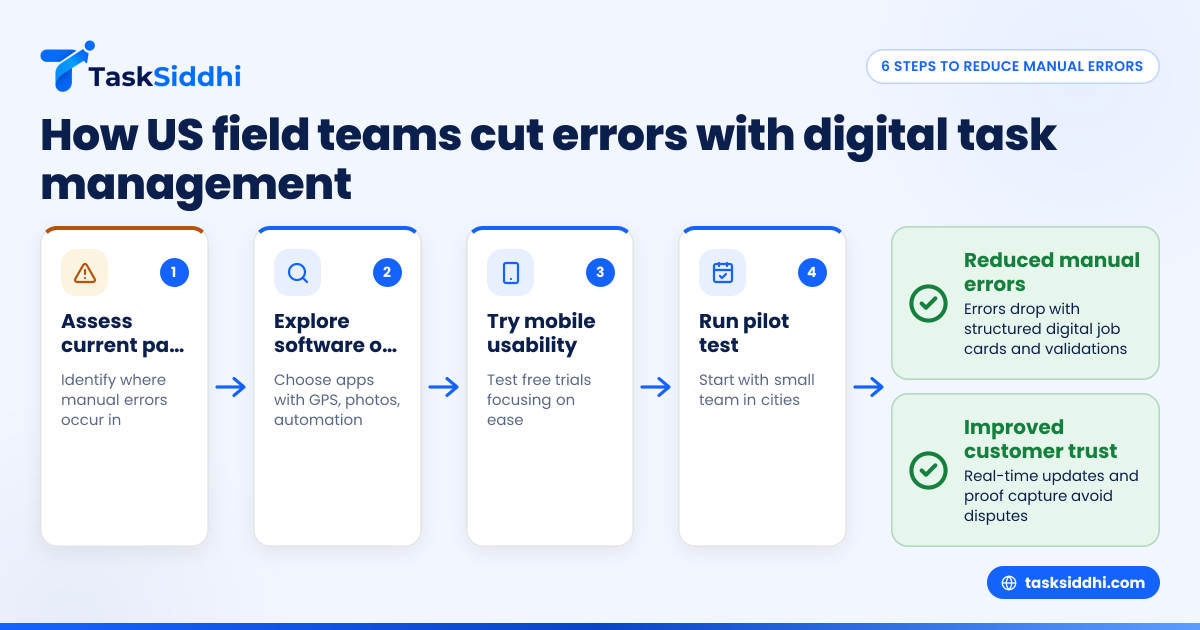
Reducing manual errors in United States field teams starts with adopting digital task management tools. These systems replace paper notes, WhatsApp messages, and spreadsheets with automated workflows, real-time updates, and centralized job tracking, helping teams work more accurately and efficiently. For field teams operating in sectors like HVAC repair, pest control, or facility maintenance, this shift can save time, reduce disputes, and boost customer satisfaction.
Key takeaways
- Digital field team task management cuts down manual data entry errors.
- Real-time updates keep field teams and managers on the same page.
- Automation can trigger reminders and validations, reducing missed steps.
- Tracking site visits with photo or GPS proof avoids disputes and errors.
- AI field team features can help prioritize and allocate jobs smartly.
- Using mobile apps simplifies data capture and job status updates on the go.
How to get started with digital field team task management
Getting started with digital field team task management means assessing your current processes, exploring software options tailored to US field teams, testing mobile usability, and planning a pilot with a small group before a full rollout. This staged approach helps reduce errors while ensuring smooth adoption by your staff.
1. Assess your current pain points
Identify where manual errors most affect your field team, whether in job assignments, client communication, follow-ups, or invoicing.
2. Explore tools
Look at apps with proven track records for US field teams and relevant features like photos and GPS proof or automation.
3. Try before buying
Use free trials or demos, prioritizing the mobile experience and ease of data capture in real work environments.
4. Plan a pilot
Start with a handful of users in Chicago or Detroit to test the workflow. Monitor ease of use and error reduction.
5. Gather feedback
Adjust setups to better match your team’s needs, updating templates or training materials as needed.
6. Roll out broadly
Train everyone and enforce consistent usage for data accuracy and improved customer experience.
Integrating with existing finance software like QuickBooks streamlines invoicing and payroll, reducing errors further and speeding cash flow.
Why manual errors happen in field team task management
Field teams in industries like HVAC repair, plumbing, pest control, or facilities maintenance rely heavily on frontline workers visiting sites, completing jobs, and reporting back accurately. Many still manage tasks using paper job cards, WhatsApp groups, and Excel sheets. These methods invite common errors:
- Lost or illegible job cards: Paper can be misplaced, damaged, or hard to read. Imagine a Houston HVAC service technician loses a job card with important customer instructions. Without a record, the work may need repeating or cause delays.
- Delayed updates: Messages or sheets may not be updated in real time. For example, a Detroit pest control crew might finish a job but fail to inform the dispatcher promptly, leading to inefficient routing or customer calls.
- Incorrect data entry: Manual retyping of job details causes mistakes. Transferring data from paper to Excel or WhatsApp can result in wrong addresses or parts ordered, increasing costs.
- Missed follow-ups: Without reminders, some steps or visits get skipped. Skipping a follow-up visit in maintenance can lead to equipment failure or unhappy clients.
- Confused priorities: Managers cannot easily sort urgent from routine jobs. For instance, a plumbing crew in Chicago might treat all requests equally, missing emergency calls that need immediate attention.
These errors cause longer job cycles, unhappy clients, and wasted employee hours fixing mistakes. Field teams in US cities like Chicago, Houston, and Detroit face these challenges daily, impacting customer satisfaction and business costs.
How does digital field team task management reduce errors?
Digital task management systems replace analog records with structured standardized digital records. Instead of paper job cards or informal messages, teams create, assign, update, and close tasks using software. This shift reduces manual errors by:
1. Providing structured job cards
Each job has defined fields for address, client info, task details, and deadlines. For example, instead of scribbled notes, a standardized digital form ensures the Houston HVAC team includes exact unit models, parts needed, and service type. This reduces guesswork and errors in ordering or preparation.
2. Real-time syncing
Changes and updates are instantly visible to the whole team. A Chicago facility manager can see when a technician logs a completed client visit, enabling faster invoicing and rescheduling. This real-time visibility eliminates phone back-and-forth and miscommunication.
3. Automated validation
The system can require mandatory fields or verify data formats. If a Detroit pest control worker forgets to enter the chemical batch number or client signature, the app can block submission until corrected. This reduces incomplete or inaccurate records.
4. Photo and GPS proof capture
Site visit photos and location stamps ensure work was done correctly. For example, a plumbing crew captures “before and after” images in customer homes in Houston for proof of completed repairs. GPS data confirms visits occurred onsite, avoiding “ghost entries” or billing disputes.
5. Task prioritization and alerts
Software can flag overdue tasks or prioritize urgent jobs. Managers get automated reminders if service calls in Chicago remain open past SLA deadlines, so they can reassign or intervene promptly.
6. Dashboard and reports
Managers have clear insights into job status, hours worked, and delays. In Detroit, this helps spot technicians who consistently run behind schedule or clients demanding repeated visits, so process improvements can follow.
By reducing guesswork and manual entries, digital tools enable field teams to focus on quality execution rather than chasing paperwork.
Can AI field team capabilities cut errors further?
AI field team features apply artificial intelligence to optimize scheduling, resource allocation, and error detection. They can:
- Analyze past job durations and delay patterns to predict realistic schedules. For example, AI might learn that a type of pest control treatment in Detroit takes 90 minutes on average, avoiding overbooking.
- Automatically assign jobs to workers nearby or with relevant skills. A Chicago HVAC crew member qualified for refrigeration work gets auto-assigned related jobs, increasing first-time fix rates.
- Spot data inconsistencies and alert managers. If a field worker submits a job completion time shorter than the historical minimum for that task, AI flags a possible error for review.
- Offer voice-to-text input or auto-fill forms on mobile for faster, more accurate data entry. A technician can report findings hands-free while working in a noisy environment.
These intelligent automations complement core task management to reduce risks and improve efficiency even more.
How do I choose the right digital field team task management software?
Choosing the right software involves balancing features and usability:
- Ease of use for field staff: The app should be simple to install and update jobs, even for less tech-savvy technicians. Complex interfaces reduce adoption rates, increasing manual work elsewhere.
- Mobile app availability: Field teams need to update tasks from phones or tablets onsite. Many teams in Chicago or Detroit rely entirely on mobiles since laptops are impractical onsite.
- Proof capture: Support for photos, timestamps, and GPS tagging is vital to reduce disputes and manual reporting.
- Automation and reminders: Helps avoid missed or overdue jobs by prompting follow-ups or quality checks based on your defined workflows.
- Reporting features: Allows managers to monitor productivity, crew locations, and bottlenecks from a dashboard without chasing data.
- Integration: Should connect smoothly with your finance tools like QuickBooks or Stripe. This ensures seamless invoicing, payroll accuracy, and avoids duplicate entries.
- Scalability: Consider whether the solution can grow with your team size and complexity, supporting multiple locations or job types.
Request a demo or trial to see if the software suits your team’s specific workflows and tech comfort.
What does set-up look like for my United States field crew?
Setting up digital task management usually involves:
1. Defining workflows
Outline your typical job process, steps completed onsite, quality checks, and approvals. For example, a Houston HVAC team might detail steps for installing new units, from arrival, diagnostics, parts replacement, to customer sign-off.
2. Creating job templates
Build standard job cards with required fields: client name, address, job type, parts needed, time estimated, and compliance forms like 1099 documentation if handling contractors.
3. Importing existing data
Upload clients, current tasks, and schedules from Excel or CRM systems to avoid restarting from scratch.
4. Training staff
Brief your field technicians and managers on using the tool and mobile app. Hands-on sessions with real job cards help accelerate familiarity.
5. Launching phased roll-out
Start with a small team or pilot region, such as your Detroit operation. Gather user feedback and troubleshoot issues before wider deployment.
6. Continuous monitoring
Use reporting to identify recurring errors or bottlenecks and optimize workflows. For instance, if late arrivals spike due to poor routing, AI or route optimization will fix this.
US field crews often appreciate when software also supports compliance documentation like 1099 forms or state sales tax reporting within invoicing workflows for streamlined accounting.
How does this impact compliance and client communication?
Using digital records and timestamps for site visits builds trust with clients by providing clear evidence of work completion. This helps companies comply with regulations around field service documentation and billing accuracy.
TCPA compliant communication
Automated communication templates ensure compliance with the Telephone Consumer Protection Act (TCPA) during outreach and follow-up, avoiding unwanted calls or messages.
CAN-SPAM adherence
For email updates or marketing related to services, software can incorporate compliance with CAN-SPAM rules, including unsubscribe options.
Clients see timely updates and proof of service, improving satisfaction and repeat business. Managers spend less time handling dispute resolution or explaining delays, reducing operational costs.
Frequently asked questions
What is the main benefit of digital field team task management?
It mainly reduces manual data errors and speeds up communication. Automated workflows and mobile entry help field teams avoid mistakes common with paper, WhatsApp, or Excel processes. This brings faster job turnaround and happier clients.
Can AI features handle my complex scheduling needs?
Yes, AI can analyze your field team’s historical tasks and create smarter schedules that optimize travel time and skill matching. This reduces delays, overtime, and improves first-time fixes.
How secure is digital task management for sensitive client data?
Reputable platforms follow industry standards to protect data privacy. Always check if the software encrypts data and limits access based on roles. This is critical for regulated sectors like healthcare or government contracts.
Do mobile apps work well in areas with poor internet?
Many apps, including TaskSiddhi’s, allow offline mode data entry that syncs automatically when connectivity restores. This ensures no loss of information during site visits in suburban or rural US locations.
Will digital task management integrate with QuickBooks or Stripe?
Most modern systems support integration with popular US finance tools. This helps automate billing and payroll, reducing manual work and errors in accounting.
How much training is needed for my field crew?
Training time is usually short, focusing on the mobile app interface and standard workflows. Hands-on practice with real job cards helps accelerate adoption. Ongoing support smooths any transition challenges and encourages consistent use.
Switching to digital task management helps US field teams eliminate errors, improve customer trust, and save time previously lost to manual paperwork. To see how it works in practice, take a product tour or explore plans suitable for your business on the pricing page.