














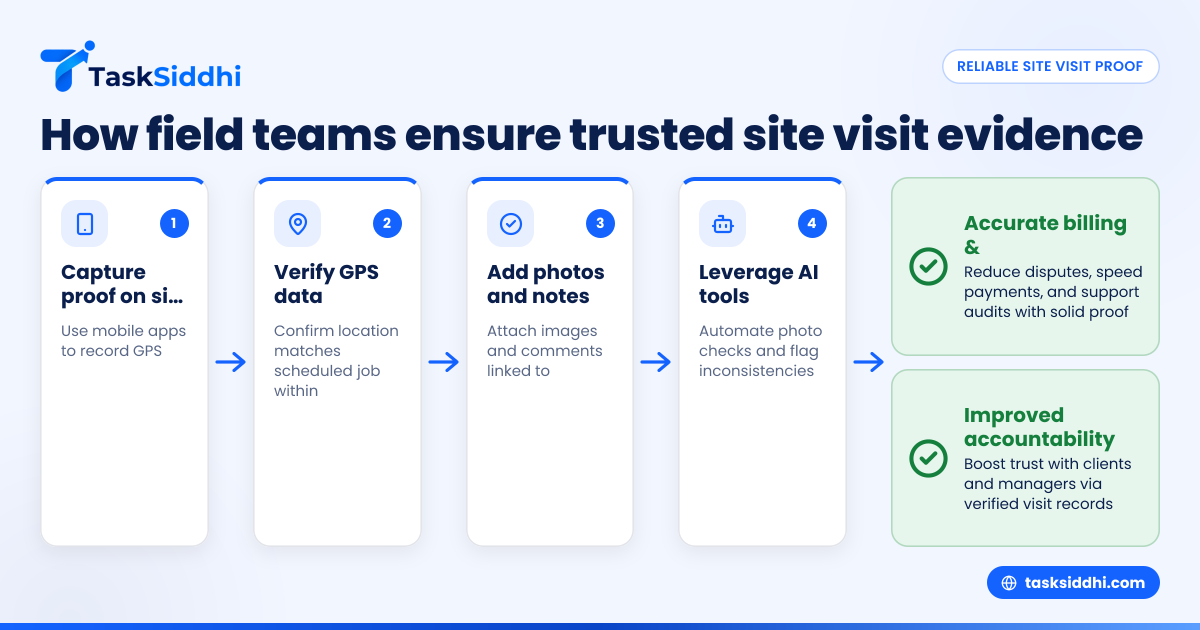
Field teams in the United States can ensure reliable site visit proof by using mobile apps that capture GPS location, timestamps, photos, and notes during their jobs. These tools boost accountability, improve reporting accuracy, and provide verifiable evidence for clients and managers.
Key takeaways
- Site visit proof verifies fieldwork via GPS, photos, and timestamps.
- Mobile apps streamline proof capture and improve data accuracy.
- GPS tracking ensures teams are on location during visits.
- AI site visit tools add automation and reduce manual errors.
- Accurate proof supports billing, compliance, and client trust.
- Using the right app helps reduce paperwork and communication hassles.
What is site visit proof and why does it matter?
Site visit proof is documented evidence that a field team or service technician physically visited a customer site or job location. This proof usually includes the date, time, GPS coordinates, and photos or notes related to the visit. It acts as verification for completed work or inspections, supporting invoicing and quality control.
In industries like HVAC repair, property maintenance, pest control, or construction in cities like Chicago and Houston, accurate site visit proof is vital. It reduces disputes over work completion, prevents fraudulent billing, and improves communication between office teams and the field. Without reliable proof, managers risk unpaid or delayed invoices, unhappy clients, and complicated audits.
How can mobile apps help capture reliable site visit proof?
Mobile apps designed for field teams make it easy to capture and store site visit proof in real time. These apps typically provide:
- GPS tracking to confirm location at the visit.
- Automatic timestamps when job cards or checklists are updated.
- Photo capture with metadata to show status or issues.
- Notes or voice memos linked to specific job tasks.
- Offline capabilities for areas with poor network.
- Secure storage and syncing with office software.
Using mobile apps reduces reliance on paper forms or scattered communications via SMS or emails. Teams in Detroit or Phoenix can quickly complete job cards with photos and get approvals without returning to the office. Managers see accurate, time-stamped proof instantly, allowing fast invoicing through QuickBooks or Stripe integration.
How does AI site visit technology enhance reliability?
AI site visit solutions automate parts of the proof process, improving accuracy and saving time. For example, AI can analyze photos to detect completed work, machinery status, or safety compliance. It can also flag discrepancies like photos taken far from the job location or outside scheduled hours.
This reduces human errors like forgetting to capture proof or falsifying timestamps. AI can even suggest job statuses or next steps based on visit data, streamlining reporting and decision-making. For US companies handling multiple field teams, AI site visit features increase confidence that all visits are valid and documented correctly.
How do I ensure GPS data is accurate and trustworthy?
GPS data is foundational for site visit proof, but it must be reliable:
- Use mobile apps with built-in GPS that record coordinates automatically.
- Require GPS capturing every time the job card updates or photos are taken.
- Check that GPS readings match the scheduled job location within a small radius (typically a few hundred feet).
- Avoid manual location entries by team members to prevent errors or misuse.
When GPS data is combined with photos whose metadata shows the same location and time, proof is harder to dispute. Providers like TaskSiddhi offer mobile app tools with GPS accuracy verification to meet this need.
What are common challenges with site visit proof in US field teams?
Several challenges can affect reliability:
- Poor mobile network coverage causing delayed proof uploads.
- Team members forgetting to take photos or update records on site.
- Manual paperwork or WhatsApp messages that are hard to track or verify.
- Inconsistency in capturing location data or timestamps.
- Privacy concerns about constant GPS tracking.
Addressing these requires using a comprehensive app that supports offline use, prompts field staff to complete proof steps, and maintains a balanced approach to GPS tracking that respects employee privacy but ensures accountability.
How can managers encourage field teams to adopt proof capture apps?
Successful adoption depends on:
- Training teams on how to use the app and why accurate proof matters.
- Demonstrating time saved compared to paper forms or WhatsApp follow-ups.
- Setting clear policies about mandatory photo and GPS capture for site visits.
- Providing feedback loops showing how proof data speeds up billing and improves customer satisfaction.
- Choosing apps with an easy interface that works smoothly even on basic smartphones.
Embedding proof capture into daily workflows increases compliance and makes managers confident that job completion evidence is solid.
How do I use site visit proof for billing and compliance?
Reliable site visit proof supports billing by proving that work occurred on specified dates and at agreed locations. It reduces payment disputes and speeds up collections. Many US states have sales tax implications for service jobs; proof helps document taxable events correctly.
Compliance also benefits as proof files show adherence to safety inspections, regulatory checks, or contract terms. For clients requesting 1099 documentation or audits, having solid proof is invaluable.
Integrating your proof system into QuickBooks or ERP systems makes tracking invoices and field data seamless. Reporting dashboards provide managers with visibility across teams and jobs, highlighting proof status and exceptions immediately.
How do site visit proof apps work offline?
Field teams often work in areas with little or no cellular coverage, like rural Wisconsin or upstate New York. Good site visit proof apps allow data entry, photo capture, and GPS logging even offline.
When connectivity resumes, the app automatically syncs the stored data with the server, ensuring no proof is lost. This is essential to maintaining accurate historical records and avoiding gaps that cause billing or compliance headaches.
Using apps with strong offline capability removes one common excuse for missing proof and keeps teams productive anywhere.
What types of businesses benefit most from site visit proof apps?
US companies with regular site visits or service calls get significant benefits. Common examples:
- HVAC and plumbing services in Detroit managing emergency repairs.
- Landscaping and lawn care contractors in Houston scheduling weekly visits.
- Pest control firms confirmed treated vs untreated areas in Chicago.
- Facility management teams handling multiple client sites.
- Installation and inspection companies working on construction or safety audits.
If your business currently relies on WhatsApp updates, spreadsheets, or paper forms for tracking visits, switching to dedicated mobile apps can save hours weekly and increase proof reliability.
Use TaskSiddhi to simplify capturing GPS-verified site visit proof with photo and note attachments. Explore how it works on our product tour and find your best option on our pricing page.
Frequently asked questions
What is the difference between GPS tracking and site visit proof?
GPS tracking records location data over time, often continuously. Site visit proof uses GPS data along with photos, timestamps, and notes specifically tied to job completion to verify that a visit occurred. Proof is more comprehensive and task-focused than simple location tracking.
Can site visit proof apps integrate with QuickBooks or Stripe?
Yes, many field management apps support integrations with QuickBooks and Stripe. This synchronization helps automate invoicing based on verified visits, reducing manual errors and speeding up payments.
How is employee privacy handled when using GPS tracking?
Reliable apps limit GPS capture to the duration of the job or working hours. They typically do not track location continuously outside work. Clear company policies and transparent communication ensure compliance with US privacy laws and maintain trust.
How accurate is GPS for site visit proof in urban areas?
GPS is usually accurate within 10-30 feet in cities like Chicago or Houston. Using photo metadata alongside GPS coordinates further confirms proof accuracy. Apps may also use triangulation or Wi-Fi signals for better precision indoors.
What if a technician forgets to capture proof during a visit?
Top apps send reminders or block job completion if required proof steps like photos or location are missing. Managers can also review reports and follow up to ensure compliance and identify training needs.
How does AI site visit help my business?
AI site visit tools analyze captured data automatically, detect inconsistencies, and suggest corrective actions. This frees managers from manual verification tasks, reduces errors, and boosts confidence that all site visits are authenticated.