














Replacing Excel with mobile apps transforms field team task management by enabling real-time updates, clear job assignments, and automated reporting. Mobile apps reduce errors, improve accountability, and boost team productivity compared to manual Excel trackers. This leads to smoother operations for US field teams managing jobs on the go.
Key takeaways
- Mobile apps provide real-time task updates and status tracking, unlike static Excel sheets.
- Automated reminders and notifications reduce missed deadlines and improve accountability.
- Digital job cards with proof of work simplify record-keeping and client reporting.
- Field teams can track time and expenses more accurately with mobile tools.
- Integration with finance and CRM systems streamlines workflows and billing.
- AI field team features in some apps help optimize job assignments and predict resource needs.
Why do Excel trackers fall short for field team task management?
Excel trackers work but have serious limits for field teams. They are slow to update, prone to errors, and lack automation. Teams often juggle multiple versions, causing confusion and delays.
Excel spreadsheets have long been a go-to for small US field service companies, construction teams, and client-facing crews. They are cheap and familiar, but their limitations become clear quickly. Excel trackers can be slow to update since only one person can actively edit at a time, leading to outdated status information. Teams often share multiple versions via email or cloud folders, resulting in errors and confusion.
Manual entry also increases the risk of mistakes, missed data, and lost job cards. Tracking timesheets, materials used, and client approvals is cumbersome without automation. Managers spend hours consolidating sheets to prepare reports or identify bottlenecks, reducing efficiency.
For example, a roofing company in Houston might use an Excel sheet to track job progress. When a crew chief finishes a skylight replacement, they need to call or message the office to update the status. If the update is delayed, the scheduler can’t assign new jobs effectively, hurting responsiveness to clients.
Mobile apps solve these problems by digitizing the entire job lifecycle from assignment to completion. This includes real-time updates, proof collection, and integrated reporting that Excel simply cannot deliver.
How can mobile apps improve field team task management?
Mobile apps replace static Excel sheets with dynamic digital boards. Each task or job becomes a card that can be updated instantly through the app on smartphones. Here’s what a field team gains:
- Real-time status updates: Team members mark when jobs start, pause, or finish, visible immediately to managers.
- Job documentation: Photos, signatures, and notes captured on site provide proof of work and reduce disputes.
- Time tracking: Automatic timers ensure accurate labor hours for payroll and client billing.
- Automated reminders: The app can send alerts for pending tasks, approvals, or follow-ups.
- Centralized data: All information syncs to a cloud database, eliminating version conflicts.
- Customizable workflows: Managers build boards that fit their team’s specific processes.
- Mobile access: Crews update tasks from any location without returning to the office.
For instance, a Detroit HVAC service team can use job cards within the app to attach images of completed repairs and collect client signoffs immediately. The back office views these updates live and can generate invoices fast.
What are the key features of mobile apps for field team task management?
Look for these features when choosing a mobile app to replace Excel trackers:
- Boards and views: Visual task boards allow easy monitoring of work stages like New, In Progress, and Completed. Boards and views let you customize views for different teams or projects.
- Job cards: Digital cards hold task details, statuses, assigned personnel, and attached proof such as photos. This replaces paper job cards and spreadsheets.
- Time tracking: Built-in timers record start/end times for each job, linked directly to workers and tasks. See time tracking for how it aids accuracy.
- Proof of work: Upload photos, forms, and notes directly from the field to validate jobs and client approvals.
- Reporting: Generate detailed performance and productivity reports automatically to analyze trends and optimize operations with reporting.
- Mobile app: Support for iOS and Android devices ensures field workers can update jobs anytime via the mobile app.
- Automation: Automated alerts, status changes, and reminders reduce manual follow-ups and help enforce SLAs. Automation can streamline repetitive tasks.
How does AI field team technology boost task management?
AI field team tools analyze data on job durations, travel times, and employee skills to optimize scheduling and resource allocation. For example, an app might suggest assigning a tech with specific certifications to a complex repair, or cluster jobs to reduce travel across Chicago.
AI can also predict delays based on prior data and alert managers proactively. These insights help avoid bottlenecks and improve customer satisfaction.
How difficult is it to switch from Excel trackers to a mobile app?
Switching from Excel to a dedicated mobile app is straightforward with proper planning. Most apps offer easy imports of existing Excel data so you don’t start from scratch. Training sessions for your team can be brief because mobile apps focus on user-friendly interfaces designed for field workers.
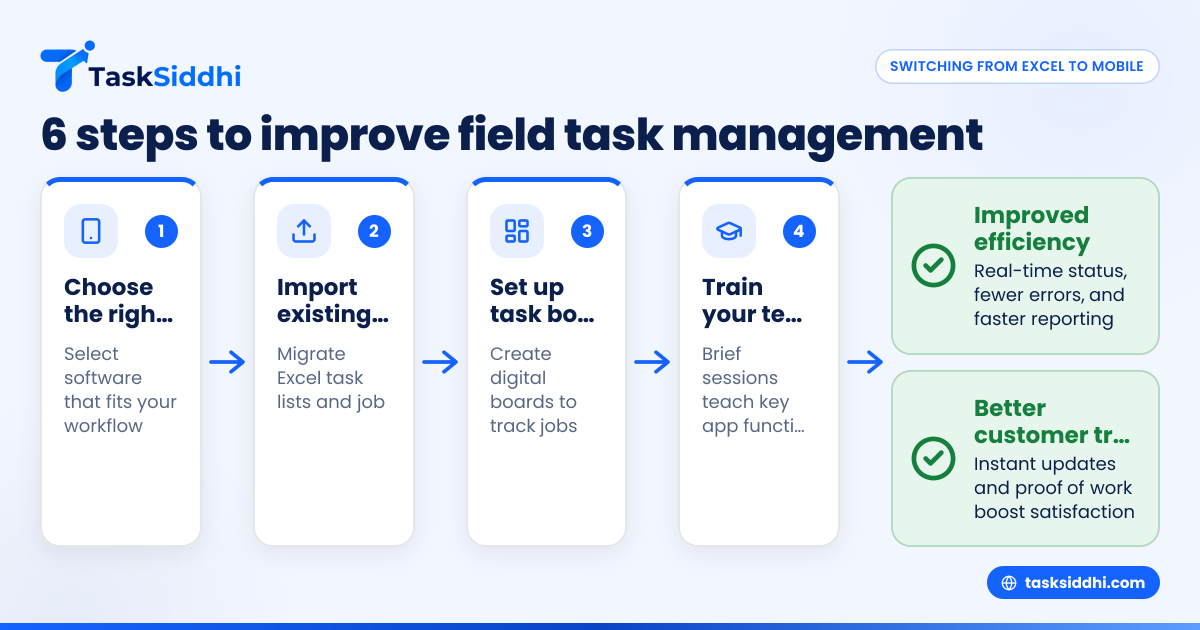
Steps to transition:
- Choose an app that fits your workflow and team size.
- Migrate your current Excel sheets by importing task lists and job info.
- Set up your task boards and assign roles.
- Train field and office staff on the app’s key functions.
- Launch in parallel with Excel for a short overlap to fix any issues.
- Fully switch once smooth operation is confirmed.
With daily use, teams quickly appreciate fewer errors, better communication, and less admin work.
Can mobile task management apps integrate with my current US business software?
Yes, many task management apps connect to widely used platforms like QuickBooks for accounting, Stripe for payments, and CRM systems like Salesforce. Integration allows job costs and invoices to flow automatically, reducing manual data entry.
For service businesses, integration with electronic signature apps or document management systems also speeds client approvals and compliance.
Check if the app supports the APIs or connectors relevant to your existing software stack before committing.
What security and compliance features should US field teams look for?
Since field task management involves sensitive client data, ensure your mobile app provider follows best security practices like data encryption and secure user authentication. While SOC 2 certification is often requested by enterprise customers, smaller US firms should at minimum verify secure hosting and regular backups.
Additionally, if you handle client outreach within the app, comply with CAN-SPAM and TCPA regulations governing communications. Make sure the app’s messaging features allow you to manage opt-outs and consent properly.
How much does a mobile app for field team task management cost?
Costs vary based on the app’s features, number of users, and support levels. Many providers offer tiered pricing plans suited to small teams with 5-30 people typical in US field businesses. Free trials or freemium versions can help you evaluate functionality before paying.
Instead of just comparing price, consider the value gained in saved time, reduced errors, and improved customer satisfaction.
Why is mobile task management especially useful for US field service companies?
US field teams work across widespread areas, often in cities like Houston, Chicago, and Detroit, where travel times can be significant. Mobile apps reduce the need for workers to return to offices or update spreadsheets manually, leading to faster turnaround.
They also help comply with US-specific regulatory requirements, improve invoice accuracy with time tracking, and provide clients with real-time job status, which increases trust and repeat business.
How to get started with mobile apps for field team task management?
Starting with a mobile app is easy and rewarding. First, identify your current management challenges and what you want to improve. Then pick an app tailored for service jobs, field visits, or client work.
Most apps offer free trials—use one to test daily workflows with your team. Import your Excel data and set up digital task boards. Train staff using the app’s built-in guides or short sessions. Monitor how quickly the team adapts and adjust as needed.
This stepwise approach ensures a smooth shift from Excel to mobile, improving efficiency and accuracy.
Frequently asked questions
Can mobile apps replace Excel for all field team tasks?
Mobile apps cover most field tasks like job tracking, time logging, and reporting better than Excel. While some firms use Excel for complex financial work, apps focused on field teams reduce errors and save time in daily operations.
Is data secure when using cloud-based field management apps?
Reputable apps use strong encryption and secure login methods. Always check a provider’s security policies before storing sensitive client or employee data offsite.
How do mobile apps handle offline field work without internet?
Most apps let field workers update jobs offline and sync automatically when online. This prevents data loss in low-connectivity areas.
Will my team need special smartphones for mobile apps?
No, apps typically support common Android and iOS devices your team likely already uses, keeping costs low.
Can AI features in field team apps save money?
AI tools optimize job assignment and scheduling, reducing travel and overtime costs while improving resource use. This leads to real savings.
How does using mobile task management apps improve customer experience?
Clients get timely updates, accurate bills, and proof of completed work. This transparency improves trust and repeat business.