














Site visit proof is crucial for field teams in the United States to verify work done, protect against disputes, and comply with client requirements. Using mobile apps to capture timed photos, signatures, and location data ensures reliable and verifiable documentation that supports your business operations and billing.
Key takeaways
- Site visit proof includes photos, signatures, timestamps, and GPS data collected on location.
- Mobile apps help capture and organize proof securely in real time.
- Timing your proof capture immediately upon task completion prevents errors.
- Use clear photos showing context, work done, and any client approvals.
- Electronic signatures provide legally valid confirmation of job acceptance.
- Automating site visit proof collection streamlines operations and reduces disputes.
What is site visit proof and why does it matter for US field teams?
Site visit proof consists of records demonstrating that a field job or client visit took place as agreed. This includes photos, digital signatures, timestamps, and sometimes GPS data showing where and when the work was performed. For service companies in cities like Chicago or Houston, having accurate proof helps:
- Confirm the scope and quality of work done.
- Reduce payment disputes with customers or contractors.
- Support compliance and reporting for state taxes or regulatory audits.
- Streamline billing processes with verifiable evidence.
Without credible proof, businesses run the risk of unpaid invoices, repeated client calls, or legal complications. Mobile apps designed for field teams empower staff to collect this proof quickly and securely onsite.
How can a mobile app improve site visit proof collection?
Mobile apps centralize and automate the process so proof is consistent, accurate, and hard to dispute. Staff can:
- Capture photos at the point of work with automatic timestamps.
- Collect electronic signatures directly on the device.
- Attach notes or checklists confirming task completion.
- Sync data to the cloud for instant manager access.
- Quickly generate reports for billing or compliance.
This reduces errors from manual reporting or lost paperwork. In addition, apps often use your phone’s GPS to confirm location, adding another layer of trust.
When is the best time to capture photos and signatures during a site visit?
Photos and signatures should be captured immediately after completing critical steps, or ideally, at each major milestone on site. Delaying proof capture can lead to forgotten details or confusion.
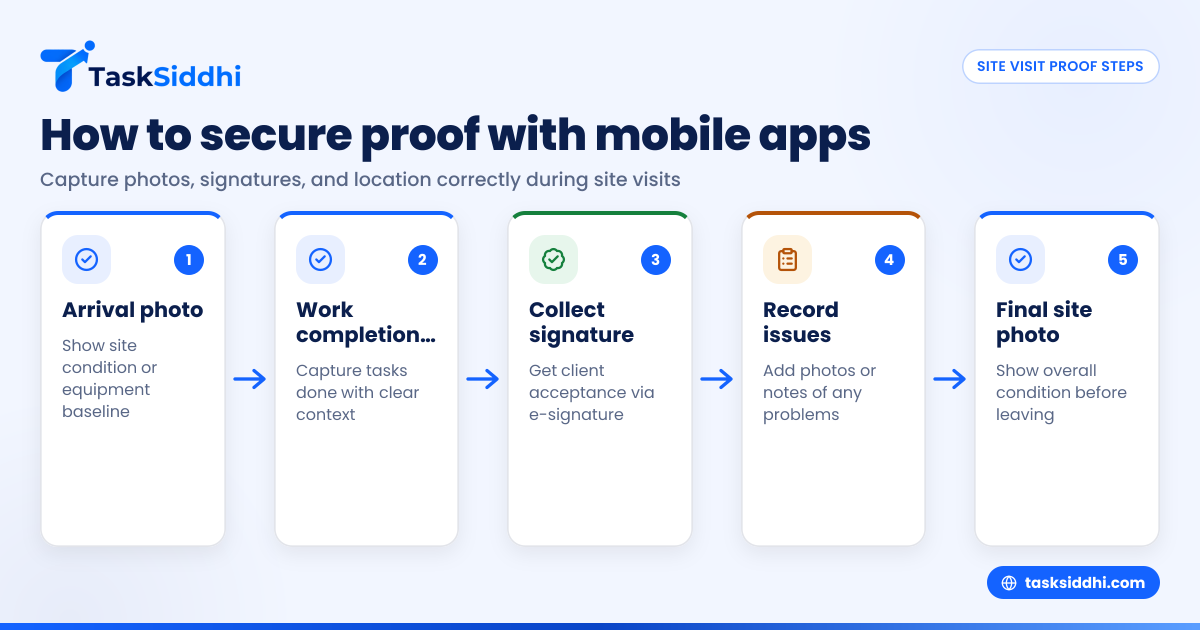
Steps to follow:
- Upon arrival, take a photo of the site’s condition or equipment baseline.
- After performing work, capture photos showing tasks done.
- Have the client or site supervisor sign electronically confirming acceptance.
- Take additional photos or notes if any issues arise.
- End with an overall site condition photo before leaving.
This timeline creates a clear narrative and prevents troubles from last-minute loose proof.
What details make photos stronger proof on site visits?
Not all photos are equally useful. Strong site visit proof photos should:
- Clearly show the work completed and its context.
- Include identifiable landmarks, equipment, or people.
- Have good lighting and focus for visibility.
- Avoid clutter or unrelated subjects.
- Show before-and-after views when possible.
- Include timestamp and GPS location embedded by the app.
Photos that meet these standards build trust with clients and protect your business against disputes.
How can electronic signatures help validate site visit proof?
Electronic signatures collected on mobile devices confirm client or customer approval in real time. US laws such as the ESIGN Act make e-signatures legally binding for many business documents. Benefits include:
- Faster approvals onsite without paperwork.
- Secure storage linked to specific job records.
- Immediate visibility for your office staff.
- Reduced errors from illegible or lost paper forms.
Combining e-signatures with photographic proof strengthens your ability to back up claims and invoice with confidence.
How does AI site visit technology enhance field proof collection?
AI site visit tools analyze photos and data collected on site to auto-verify work completion and highlight inconsistencies. They can:
- Detect missing checklist items or low-quality photos.
- Suggest automated follow-ups if proof is incomplete.
- Extract text from images for easier reporting.
- Provide predictive insights based on prior visits.
Such AI-driven assistance helps managers maintain quality without manual checks, saving time and improving accuracy.
What are common challenges in capturing site visit proof and how to overcome them?
Challenges include:
- Forgetting to capture proof due to busy schedules.
- Poor photo quality or missing context.
- Clients reluctant to sign electronically.
- Disorganized or delayed data syncing.
Solutions:
- Train staff on best practices and benefits.
- Use mobile apps with prompts and checklists.
- Educate clients on quick e-signature benefits.
- Ensure reliable internet or offline app mode.
- Automate reminders and proof validation steps.
Consistency and user-friendly tools make proof capture routine and reliable.
Why is secure storage important for site visit proof?
Site visit proof often contains sensitive client and employee data. Secure storage protects privacy and your business reputation. Apps with encrypted cloud storage reduce risks of:
- Data breaches or unauthorized access.
- Loss of critical records due to device damage.
- Compliance violations with data protection regulations.
Mobile app platforms built for US service teams prioritize security while making proof accessible when needed.
How can field team managers use site visit proof to improve operations?
Managers can:
- Track field progress in real time using proof data.
- Identify recurring issues through photo and signature reports.
- Provide coaching based on site documentation.
- Justify billing or change orders with clear proof.
- Demonstrate regulatory compliance during audits.
This actionable insight improves productivity and customer satisfaction.
How much does it cost to implement mobile app-based site visit proof?
Costs vary by solution and team size. Many apps offer scalable pricing with no upfront hardware investment besides smartphones or tablets staff already carry. Consider:
- Subscription fees based on users or features.
- Training time and onboarding.
- Potential savings from dispute reduction and faster billing.
Investing in proofing technology typically pays off quickly by protecting revenue and increasing operational visibility.
How do I get started with mobile apps for site visit proof?
- Identify your key proof requirements (photos, signatures, location).
- Choose a mobile app tailored for field teams that meets these needs.
- Train your staff and clients on its use.
- Integrate proof data into your billing or reporting workflows.
- Monitor usage and feedback to optimize practices.
Using platforms like TaskSiddhi combines mobile, boards, job cards, and reporting features to simplify proof capture and management.
Invest in modern site visit proof tools today and reduce disputes, delays, and doubts tomorrow.
Check out our product tour to see how TaskSiddhi works for your US field teams or compare plans on our pricing page.
Frequently asked questions
What counts as valid site visit proof for US service contracts?
Valid proof usually includes date- and location-stamped photos of work done, electronic client signatures, and written or digital notes describing the completed tasks. These elements satisfy most contract and audit requirements.
Can electronic signatures collected on mobile apps be legally binding?
Yes. Electronic signatures are legally recognized under the ESIGN Act and UETA, provided the signer intends to sign and the process records signature evidence securely and reliably.
How does location data improve site visit proof accuracy?
GPS data confirms the exact site where work was done. It prevents fraudulent claims and helps ensure that photos and signatures are tied to the right geographic location on the correct date.
What should I do if a client refuses to sign electronically?
Explain the ease and speed of e-signatures, assuring data security. Offer a printed form or alternative proof if needed, but emphasize benefits of immediate digital confirmation for dispute prevention.
How can AI improve the quality of site visit proof collected?
AI can auto-check photos for clarity, completeness, and relevance, flag missing information, and automate follow-ups. This ensures higher proof quality without adding extra burden on field staff.
Can mobile apps for site visit proof work offline on job sites?
Many apps offer offline modes allowing photos and signatures to be captured without internet access. Data then syncs automatically once a connection is restored, ensuring continuous proof collection in remote or low-coverage areas.