














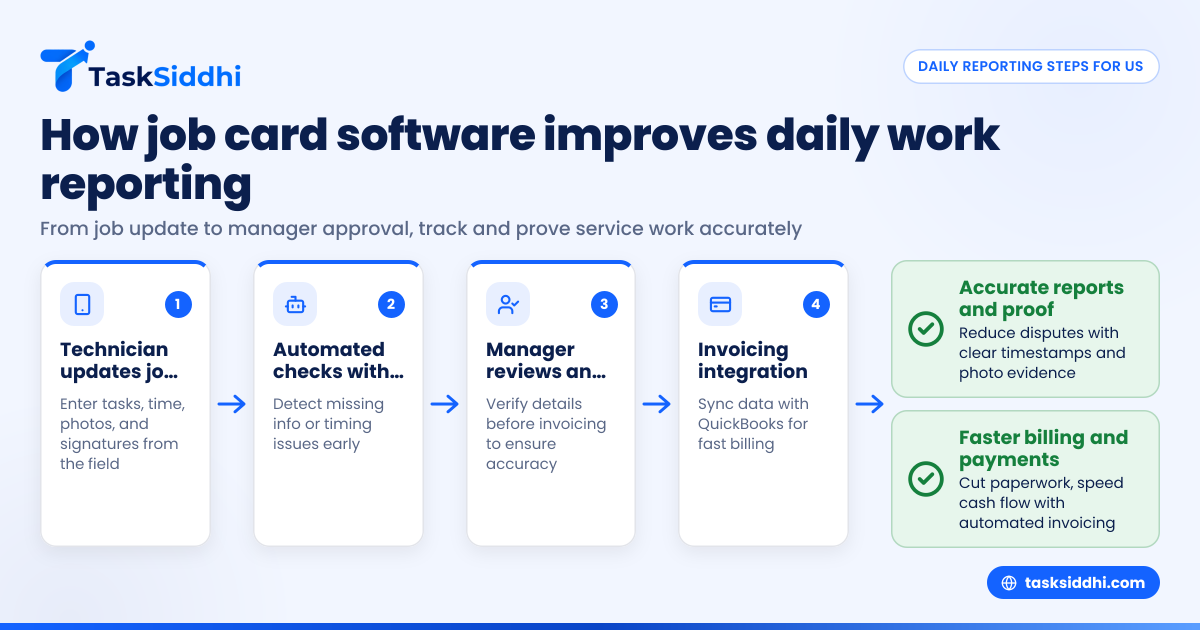
Job card software helps small U.S. service teams organize and track daily jobs digitally. It replaces paper forms and chaotic WhatsApp chats with structured job details, time tracking, and client approvals. This makes work reporting more accurate and provides clear proof of completed service.
Key takeaways
- Job card software streamlines daily task reporting for service teams in cities like Chicago and Houston.
- Digital job cards improve accuracy and reduce disputes over completed work.
- Features like photo proof, client signatures, and time tracking boost accountability.
- AI job card capabilities automate data capture and identify inconsistencies early.
- Integrations with tools like QuickBooks simplify billing based on job cards.
- Mobile apps enable field teams to update work instantly from any location.
What is job card software, and why does it matter for US small service teams?
Job card software is a digital tool that collects and manages detailed records of service jobs. It helps small U.S. service teams—such as HVAC in Detroit or pest control in Dallas—move beyond paper forms and WhatsApp chats. Teams enter job details, track time, capture photos, and get client signatures all on a mobile app.
This leads to more accurate, timely reports that managers need to approve work before invoicing. Digital job cards are searchable and secure, preventing lost or incomplete paperwork. For US small service teams, this reduces errors, speeds billing, and provides clear proof for clients and regulators.
How can job card software improve daily work reporting?
Job card software improves daily work reporting by enabling quick, organized updates directly from the job site. Instead of filling paper forms after work, technicians use mobile apps for real-time entry. This helps:
- Log accurate start and end times.
- Record detailed task notes without ambiguity.
- Attach photos as visual proof.
- Collect customer e-signatures on completion.
- Notify managers automatically when jobs update.
This results in faster reporting, fewer mistakes, and better visibility for managers who need to track progress, resolve issues, and prepare invoices quickly.
What is an AI job card, and how does it help?
An AI job card uses artificial intelligence to automate job data capture and analysis. AI can read handwritten notes or photos, turning them into structured digital records, reducing manual entry and errors.
AI also detects missing signatures or timing gaps and flags them for review. It can analyze trends to help small service teams optimize scheduling and resource use. This automation saves time and improves report accuracy without extra technical effort.
AI job card features make work simpler for small U.S. teams by cutting admin tasks and highlighting potential issues early.
How does job card software provide proof of completed work to clients?
Digital job cards capture multiple proof points: timestamps of service, geotagging of the location, photos of before-and-after conditions, and electronic customer signatures. This combo builds trust by verifying what was done, when, and where.
Managers can generate consolidated reports or certificates as PDFs for clients and billing departments. Having organized digital proof helps prevent payment delays or disputes, which are common when relying on lost or incomplete paper forms.
What features should I look for in job card software for my US small service team?
Essential features include:
- Mobile app for iOS and Android to update jobs in the field.
- Real-time syncing for instant job status visibility.
- Integrated time tracking for accurate billing.
- Photo and signature capture to secure proof.
- Customizable job card templates matching your business.
- Reporting tools with exports to Excel or PDF and QuickBooks integration.
- Automation for reminders or invoicing triggers.
- Secure cloud storage complying with US privacy practices.
These make daily work easier to manage, document, and bill efficiently.
Can job card software integrate with US finance systems like QuickBooks and Stripe?
Yes, most job card software connects seamlessly with U.S. finance platforms such as QuickBooks and Stripe. This integration lets job card data—time worked, materials used, and client approvals—automatically create invoices or payment links.
It saves your back office from manual billing entry, reducing errors and speeding up cash flow. For example, a landscaping company in Houston can close out a job on-site and instantly send an invoice to clients through QuickBooks, saving valuable time.
How do mobile apps improve service teams’ ability to report on site work?
Mobile apps let technicians update job cards from any location, improving both accuracy and speed. Workers can fill details during the job, attach photos, capture signatures, and track their time precisely.
They also receive new job alerts or changes pushed from dispatch. This ensures managers in offices—from Chicago to Detroit—have real-time insights to monitor progress and reschedule resources efficiently.
How difficult is it to switch from paper job cards or WhatsApp to digital job card software?
Switching is simple with intuitive mobile apps and customizable templates that replicate your paper forms. Teams with basic smartphone skills quickly learn to submit job details and proofs.
Training focuses on using the app for job updates and capturing approvals. With time, paper forms and chaotic WhatsApp messages are replaced by instant, organized digital records without disrupting daily work.
How can job card reporting improve compliance and reduce disputes in US service teams?
Accurate job card reports provide an audit trail showing when, where, and how service was performed. This helps satisfy client contracts, insurance needs, and legal compliance.
Digital records support smooth 1099 contractor management and state tax reporting for service providers. Having proof readily available prevents payment conflicts and validates payroll based on real hours and work done.
Why is automation important in job card software?
Automation reduces manual work and ensures timely actions. It can send alerts when jobs run over time, trigger customer follow-ups, or sync job data to invoicing software like QuickBooks.
For small US service teams, this saves hours of administrative effort and helps avoid missed deadlines or billing delays. Automation focuses your team on service, not paperwork.
Getting started with job card software for your US service team
- Identify current issues like lost proof or delayed reports.
- Choose software with mobile apps, photo proof, time tracking, and automation.
- Create job card templates matching your work processes.
- Train your team to enter details and collect approvals in the app.
- Integrate with QuickBooks or Stripe for smooth billing.
- Use dashboards to track team performance and job status daily.
This approach builds your team’s confidence and shrinks paperwork hassle fast.
To see how job card software can transform your daily reporting and proof of work, explore the product tour or compare features with your current process at pricing.
Frequently asked questions
How does job card software improve accuracy in reporting?
Digital job cards enforce structured data entry with required fields and timestamps. They reduce mistakes like missing dates or illegible handwriting, making job reports reliable and complete.
Can I use job card software for various service types?
Yes, it is flexible for any kind of client-facing service work, from HVAC to landscaping or pest control. You can customize job cards to fit each service type’s unique details.
Will job card software save me money?
Yes. It cuts down paperwork, missed billing, and time chasing updates. Faster invoicing and fewer disputes improve cash flow and overall efficiency.
Is client data secure in job card software?
Reputable providers store data securely on US-based cloud servers with encrypted transmission, ensuring client info and job details stay confidential and protected.
How does time tracking work in job card software?
Time tracking is built into each job card, letting workers clock in and out on-site. It calculates total hours and flags overtime or schedule conflicts automatically.
What if my field team has limited tech skills?
Most job card software mobile apps are simple to use with guided steps. Field teams familiar with smartphones and WhatsApp apps adapt with minimal training.