














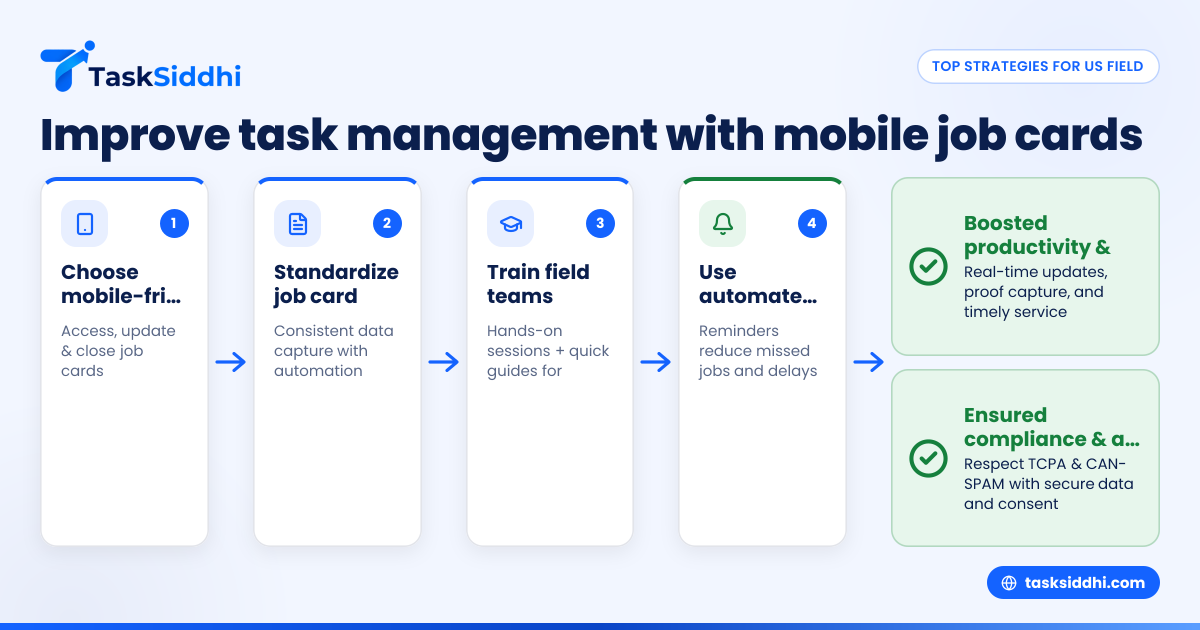
Top strategies for US field teams to improve task management with mobile job cards
Effective field team task management is the key to boosting productivity, reducing errors, and improving customer satisfaction in US-based businesses. Mobile job cards bring flexibility and real-time updates, making it easier for field teams to track tasks, record site visits with proof, and provide timely service.
Key takeaways
- Mobile job cards help field teams access and update tasks on-the-go, reducing paperwork and miscommunication.
- Automated notifications and time tracking improve task accountability and streamline workflows.
- Using mobile apps designed for field teams supports better proof of work with photos, signatures, and notes.
- AI field team tools can analyze task data to optimize schedules and resource allocation.
- US businesses should ensure mobile task management complies with regulations like TCPA and CAN-SPAM.
- Integrating mobile job cards with tools like QuickBooks and Stripe simplifies billing and reporting.
What is mobile job card task management for field teams?
Mobile job card task management refers to using digital job cards that technicians or service workers access and update on mobile devices during field visits. It replaces traditional paper cards and spreadsheets with real-time, cloud-based boards and workflows that keep teams aligned and informed.
Mobile job cards provide key details such as task requirements, location, customer information, and deadlines. Team members mark progress, add proof like photos, and log time spent. Managers get instant visibility into operations, enabling faster decisions.
This approach is particularly useful in cities like Chicago or Houston, where field teams must navigate busy streets and multiple daily jobs. It cuts down back-office delays and saves hours of administrative work.
How do mobile job cards improve field team task management?
Mobile job cards improve task management by making work visible and actionable from anywhere. Unlike WhatsApp groups or scattered Excel sheets, mobile tools centralize updates in one place.
Key improvements include:
- Real-time updates: Job status changes sync instantly.
- Proof capture: Photos, signatures, and notes document site visits clearly.
- Time tracking: Accurate logging helps optimize labor costs and payroll.
- Automated reminders: Alerts reduce missed appointments and dues.
- Data reporting: Managers can generate reports to analyze productivity and issues.
These features reduce errors, double work, and miscommunication, common pain points for US field teams managing client work or service jobs with manual systems.
How can AI help with field team task management?
AI field team systems analyze task data to recommend smarter scheduling, identify bottlenecks, and predict delays. This lets managers allocate resources better and avoid overload.
AI algorithms can also monitor job card entries for anomalies, ensuring quality and compliance. For instance, if a proof of service photo is missing, the system can automatically flag it.
Adopting AI-enhanced tools can give US businesses in Detroit or elsewhere a competitive edge by streamlining operations and improving customer satisfaction through data-driven decisions.
What are the top strategies for US field teams to improve task management with mobile job cards?
Top strategies leverage mobile apps, standardized processes, and staff training to boost task management. By choosing mobile-friendly tools and using consistent job card templates, teams record accurate data. Training ensures smooth adoption, while automation and reporting enhance accountability and insights.
1. Choose a mobile-friendly task management app with job card features
Pick software designed with mobile use in mind. It should let field workers view, update, and close job cards from smartphones or tablets without connectivity issues. A good app supports proof capture, time tracking, and offline mode.
Evaluate apps that allow customizable boards and views to fit your processes rather than forcing a rigid workflow. This adds flexibility whether your teams do service repairs, installations, or client work.
2. Standardize job card templates for consistent data capture
Create templates that outline all necessary fields such as job description, client details, materials used, and completion checklists. Standardization ensures everyone records the same information, making reporting and auditing easier.
Use built-in automation to pre-fill data or route jobs automatically based on task type or priority. This reduces manual entry errors and accelerates task assignments.
3. Train your field teams on mobile app usage and task management best practices
Hold hands-on sessions to help workers become comfortable with digital job cards and app features. Focus on timely updates, proper proof capture, and time logging. Explain how these improve billing accuracy and customer trust.
Create quick reference guides or cheat sheets accessible from the mobile app. Regularly collect feedback to identify any tool usability hurdles and address them promptly.
4. Use automated notifications and reminders to reduce missed jobs
Set alerts for upcoming tasks, deadlines, or incomplete job cards. Automated reminders via push notifications or SMS help field workers and managers stay on track.
This is vital in busy US cities where traffic or last-minute schedule changes can cause missed appointments, leading to unhappy clients and lost revenue.
5. Monitor field performance using reporting dashboards
Leverage reporting to analyze task completion rates, average job duration, and overtime hours. Identify trends such as recurring delays or skill gaps so you can make informed training and staffing decisions.
Create daily or weekly performance summaries that supervisors can access from the office or while on the road.
6. Integrate mobile job cards with accounting and CRM systems
Connect your task management app with finance tools like QuickBooks or payment gateways such as Stripe to automate invoicing and payment reconciliation. Link with CRM systems to keep client histories updated as tasks complete.
This tighter integration eliminates duplication and simplifies financial audits.
How do you ensure compliance with US regulations when using mobile task management?
Mobile task management must respect rules like the TCPA for automated messaging and CAN-SPAM for email outreach if these are part of task notifications. Always secure explicit consent from field team members and clients before sending automated communications.
Maintain audit trails of job card data and proof of services for tax and legal purposes. Ensure access controls protect sensitive client information.
Opt for tools that support secure data storage and mobile device management policies suited for your team size and industry.
What cost factors should US businesses consider when adopting mobile job cards?
Choosing mobile job card solutions involves evaluating subscription fees, licensing costs per user, and potential setup or training charges. Factor in savings from time tracked, reduced rework, and faster billing cycles.
Consider long-term ROI by calculating how improved field team task management lowers operational costs and raises customer retention.
Some providers, including TaskSiddhi, offer both free and paid plans—compare features against your requirements at the free vs paid page.
How to roll out mobile job card task management smoothly?
To roll out mobile job card task management smoothly, start small with a pilot team and clear goals. Train users well and communicate benefits. Monitor progress with reports and adjust as needed.
- Pilot with a small team to gather feedback and refine workflows.
- Set clear goals and success metrics, like reduced task delays or improved proof accuracy.
- Address training needs early and assign super users for ongoing support.
- Communicate benefits to encourage employee buy-in and adoption.
- Monitor progress using reporting and adjust processes as necessary.
In summary, mobile job cards combined with thoughtful strategies and AI assistance transform how US field teams handle task management. They bring visibility, accuracy, and speed that legacy methods cannot match. To see how this works in practice, take a product tour or explore different options on the pricing page.
Frequently asked questions
What is the difference between traditional job cards and mobile job cards?
Traditional job cards are paper-based and require manual updates and filing. Mobile job cards are digital, accessed through a mobile app, allowing real-time updates, proof capture, and automated workflows for efficiency and accuracy.
Can AI help reduce errors in field team task management?
Yes. AI tools can analyze data for missing information, flag inconsistencies, and optimize scheduling, thereby reducing errors and improving quality assurance within field operations.
Do mobile job cards work without internet access?
Many mobile apps for field teams offer offline modes. Workers can update job cards without internet, and the data syncs automatically once connectivity is restored, ensuring continuous productivity.
How do mobile job cards improve customer satisfaction?
By enabling quicker updates, accurate proof of work, and timely service, mobile job cards help avoid delays and miscommunication, leading to happier customers and better reviews.
Are mobile job cards compatible with existing business software?
Yes. Most modern mobile task management apps integrate easily with accounting, CRM, and ERP systems common in US businesses, streamlining workflows from job assignment to invoicing.
What features should I look for in a mobile job card app?
Look for ease of use on mobile devices, proof capture options, time tracking, automation capabilities, reporting dashboards, and secure data handling tailored for field teams managing service jobs or client work.