














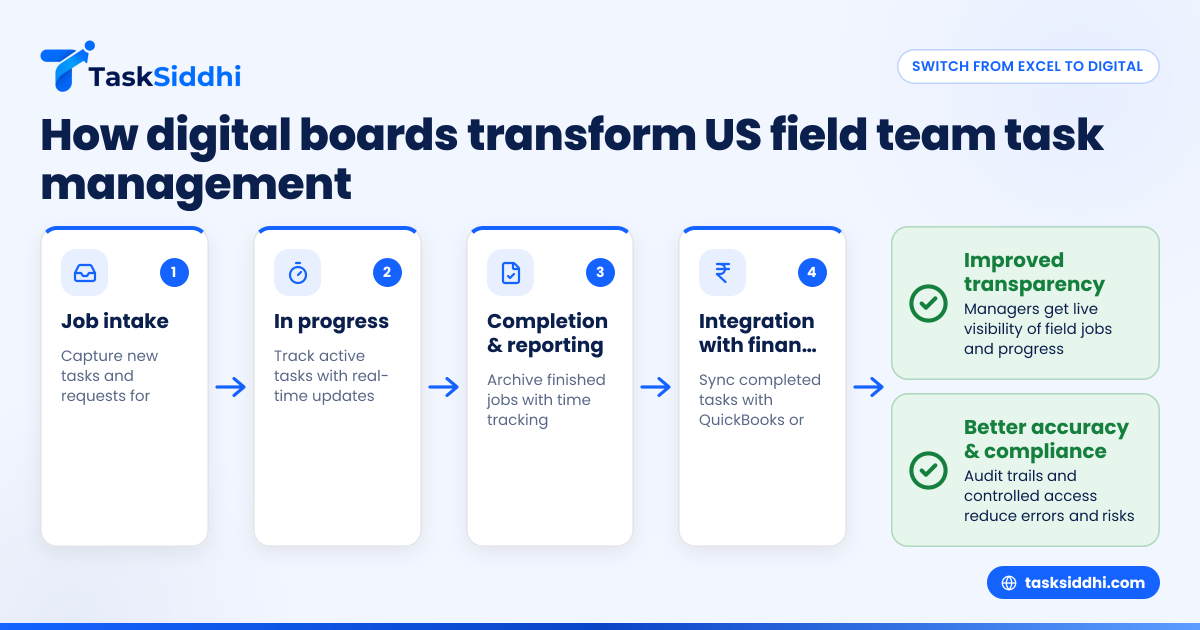
Managing field team tasks using digital boards is far more efficient and transparent than relying on Excel sheets. Digital boards provide real-time updates, easy collaboration, and better tracking, especially for US businesses managing mobile employees across cities like Chicago or Houston.
Key takeaways
- Digital boards centralize field team task management, reducing communication gaps and manual errors.
- They provide real-time updates and visibility for managers overseeing teams on site.
- Mobility and proof of work features improve accuracy and accountability in field jobs.
- Use of AI field team tools enhances resource allocation and task prioritization.
- Digital boards integrate better with finance and compliance tools commonly used in the US.
Why switch from Excel to digital boards for field team task management?
Excel sheets have been a traditional tool for tracking tasks but come with limitations. They are static, prone to errors, and lack real-time collaboration. For US businesses managing field teams—whether service technicians in Detroit or client consultants in Houston—these drawbacks can lead to missed deadlines, unclear responsibilities, and loss of revenue.
Digital boards replace spreadsheets with interactive, visual task boards accessible on any device. Each task can have dedicated job cards with details like location, task description, assigned field staff, and deadlines. This structure enables:
- Live task updates accessible to all stakeholders anywhere
- Easy drag-and-drop task prioritization and status changes
- Attach proof of work such as photos or signatures using the mobile app
- Automated reminders and status reports to keep jobs on track
Such features optimize your workforce’s productivity and improve customer satisfaction.
How does AI field team technology improve task management?
AI field team tools use artificial intelligence to analyze your tasks and team capabilities, helping managers assign and schedule jobs efficiently.
AI can optimize routes for field visits, predict delays, and suggest resource adjustments, saving time and travel costs. For US businesses with regulatory requirements, it can also flag compliance risks by tracking job progress and documentation in real time.
Integrating AI into your task management process means smarter scheduling, fewer missed appointments, and faster job completion. It frees your managers from manual allocation and improves overall operational transparency.
What is the best way to set up digital boards for field teams?
The best way to set up digital boards is to create boards that reflect real-world workflows of your team. Common examples include:
- Job intake board: Where new tasks and customer requests enter for review and assignment.
- In-progress board: Tracks tasks actively being worked on by field staff.
- Completed tasks board: Archives completed jobs and serves as a repository for proof of work.
Within each board, use columns or lists such as “To Do,” “In Progress,” “On Hold,” and “Completed” to visualize task stages.
Add job cards with details like client name, address (for cities like Detroit or Houston), contact info, estimated time, and special instructions. Cards can also include attachments such as photos or forms filled out onsite.
This setup provides clarity for your US teams dispersed across different locations and keeps managers informed instantly.
How to handle time tracking and reporting with digital boards?
Time tracking on digital boards is straightforward and vital for US businesses that bill clients or calculate payroll accurately. Many platforms allow field employees to clock in and out directly on their mobile app linked to each job card.
Managers get detailed reports showing hours spent on each task, enabling better invoicing and resource planning. Time data also helps identify bottlenecks or tasks that require additional support.
Further, reporting features can generate summaries of completed jobs, staff utilization, and customer feedback. This data supports continuous improvement and compliance with US labor laws.
What are the security and compliance benefits of digital boards?
Unlike Excel sheets shared over email or cloud drives, digital boards offer controlled access with user permissions. You can restrict views and editing rights based on role to protect sensitive client and employee information.
US businesses often face compliance requirements such as GDPR-like standards or industry-specific mandates. Digital boards can be configured to log audit trails for changes made, attach signed forms, and automatically archive records.
This auditability reduces the risk of missed documentation and helps meet expectations of clients, including government contracts or enterprise buyers.
How can digital boards integrate with US business tools like QuickBooks or Stripe?
Integration is key to streamlining your overall workflow. Modern digital boards can connect with finance tools like QuickBooks for invoicing or Stripe for payment collection.
For example, once a field job is marked complete with proof and time tracked, an invoice can be automatically generated in QuickBooks. Payments can then be tracked alongside job status without manual data entry.
Such integrations reduce errors, speed up cash flow, and improve business insights by linking operational and financial data.
How do you onboard your US field team to use digital boards effectively?
A smooth transition from Excel requires clear communication and training. Start by involving team leads and managers to create board structures together.
Offer hands-on training sessions or tutorials on using mobile app features, updating task status, and time tracking. Encourage early adopters on the team to share their success stories.
Gradually migrate active jobs from Excel while keeping records accessible for reference. Prompt your team to use boards for daily updates and reporting.
Regular check-ins ensure adoption and help tweak the setup based on actual field experience.
How to handle offline and on-site challenges with digital boards?
Field teams, especially those on remote site visits or service jobs in areas like Chicago’s outskirts, can face connectivity issues. Choose a digital board platform that allows offline mode on its mobile app.
This feature lets field staff update tasks and upload proof of service offline, syncing automatically when back online. It ensures no data is lost and managers get timely updates despite network constraints.
Encourage teams to plan for regular syncing and provide simple guides to help resolve data conflicts if any.
What is the cost implication compared to Excel?
While Excel is free or low-cost, it lacks many essential features for field team task management, leading to indirect costs in lost productivity, errors, and missed deadlines.
Digital boards often come with pricing based on number of users or features. The ROI for your US business is seen in saved time, improved customer satisfaction, and seamless integrations with reporting and time tracking tools.
Explore different plans at pricing to find an option that fits your team's size and workflow.
How do I start exploring digital boards?
To experience the difference firsthand, take a product tour of a digital board platform built for client work and service teams. Test features like task creation, collaboration, mobile updates, and reporting to see how much easier managing your field team becomes.
Start reducing the chaos around your team’s tasks today.
Frequently asked questions
How can digital boards improve communication with my field team?
Digital boards provide a single platform where updates, comments, attachments, and status changes happen in real time. This reduces phone calls and messages and keeps everyone aligned, even on the go via the mobile app.
Can digital boards handle regulatory compliance documentation?
Yes. They enable attaching signed documents, photos, and audit trails to each job card. This makes regulatory compliance easier and more transparent for US businesses.
What should I look for in a digital board for field teams?
Look for an intuitive interface, mobile app with offline capability, integration options with QuickBooks or Stripe, time tracking, and reporting features that help manage field operations end-to-end.
Will my team need new devices to use digital boards?
No, most digital boards work on smartphones and tablets your team already has. The mobile app is designed for ease of use in the field without special hardware.
Can I track time on each field task separately?
Yes, many platforms allow time tracking per task or job card. This gives accurate billing and performance data useful for payroll and client invoicing.
Is AI widely used in field team task management?
AI is increasingly integrated to automate scheduling, route optimization, and workload balancing. It helps US businesses improve efficiency and respond quickly to changing job requirements.
Managing your US field teams with digital boards instead of Excel transforms your task management, communication, and reporting. See how it works in action with a product tour, or compare different plans tailored for field service and client work at pricing.