














Managing US field teams through WhatsApp groups may seem convenient but creates challenges like lost messages, unclear task ownership, and poor reporting. Using dedicated field team task management software streamlines communication, assigns jobs clearly, tracks progress in real time, and improves accountability.
Key takeaways
- WhatsApp groups lack structure for task assignments, causing confusion and missed jobs.
- Task management software offers job cards, proof collection, and time tracking for field teams.
- Managers can monitor progress with dashboards and reports instead of chasing updates.
- Automation reduces manual follow-ups and notifies teams of schedule changes.
- AI field team features enhance scheduling, route planning, and customer communication.
- Switching from WhatsApp groups prevents errors and saves hours weekly in management time.
Why WhatsApp groups don't work well for US field team task management
WhatsApp is popular for messaging but not designed for managing work. Using it for field team task management creates problems that can impact productivity and service quality:
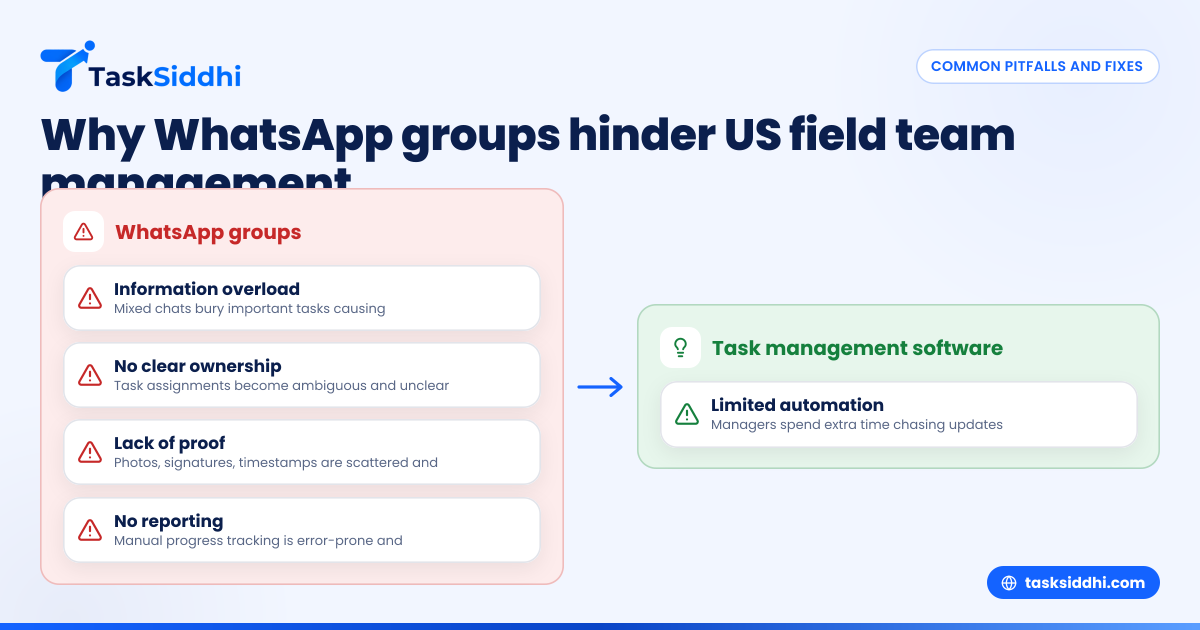
- Information overload: Group chats mix personal chatter, scheduling details, job instructions, and status updates all in one stream. Important tasks get buried quickly, increasing the chance of jobs being forgotten.
- No clear ownership: In group messages, it’s easy for job assignments to be ambiguous or missed. When multiple people reply or add comments, the original instructions become unclear. Who is responsible for each task is hard to track.
- Lack of proof: Field teams often need to provide evidence of completed work—photos of repairs, site visit signatures, or timestamps. WhatsApp makes this complicated since collecting and organizing proof requires scrolling through messages and files scattered across conversations.
- No reporting capabilities: Managers cannot visually track progress, delays, or cost overruns. All reporting must be done manually by compiling screenshots or notes from WhatsApp chats, which is inefficient and prone to errors.
- Limited automation: Task reminders, update alerts, and follow-ups rely on human efforts. Managers spend extra time sending messages and chasing teams for updates instead of focusing on strategy.
For example, a plumbing service company in Houston relying solely on WhatsApp groups may struggle to verify when a service call was completed. If a customer disputes charges or complains about delays, the company risks losing credibility because communication records are unclear and unreliable.
Real-life pitfalls with WhatsApp for field team coordination
John runs a landscaping business in Detroit with a 15-person crew. He manages daily job assignments in WhatsApp groups but faces frequent problems:
- Crew members miss out on urgent job changes buried in flood of messages.
- Supervisors send multiple duplicate reminders, wasting time.
- Photos of completed work are scattered, making it difficult to compile reports for clients.
- Time tracking is done separately on paper timesheets, causing payroll delays.
John spends hours weekly summarizing jobs, reconciling schedules, and resolving conflicts that proper task management software could handle faster and with fewer errors.
How does field team task management software improve daily operations?
Unlike WhatsApp, task management software designed for field teams offers structured tools and features that simplify work and improve oversight:
1. Digital job cards with all task details in one place
Each job is assigned on a dedicated job card containing:
- Task description and instructions
- Customer information and address (using US standard formats)
- Scheduled date and time with timezone support
- Task priority and status (e.g., pending, in progress, completed)
- Assigned workers and supervisors
- Attached documents like safety checklists or permits
Using digital job cards makes it easy for employees and managers to see exactly what needs doing without hunting for information in chat threads.
2. Proof of work collection made simple
Field workers can attach photos, videos, or scanned documents as proof of job completion directly on the job card. The software can also capture digital signatures from customers verifying the service. Time stamps automatically record when tasks start and finish, creating an audit trail useful for disputes or billing.
3. Integrated time tracking
Workers can log their hours and breaks via the mobile app or web interface. Time tracking tied to jobs automates payroll, billing to clients, and internal reporting. For example, a repair team in Chicago can quickly generate reports showing total billable time per technician per week.
4. Real-time status updates and notifications
When someone updates a job—marks it complete, reschedules, or adds notes—all involved team members receive instant notifications on their phones or computers. This eliminates the need to ping workers constantly for updates and prevents tasks from falling through the cracks.
5. Dashboards and reports for managers
Centralized dashboards display:
- Jobs by status and upcoming deadlines
- Worker productivity metrics like jobs completed and average task time
- Customer satisfaction data linked to job feedback
- Expense tracking such as mileage or materials used on service calls
Visual reporting helps managers in cities like Detroit or Houston identify bottlenecks, balance workloads, and adjust schedules proactively.
What does AI field team management mean and how can it help?
AI (artificial intelligence) in field team management refers to using intelligent algorithms to automate complex tasks and decision-making. Integrating AI within task management software can significantly boost efficiency:
AI-enhanced scheduling and job prioritization
AI can analyze historical job data and team availability to assign and prioritize jobs based on urgency, revenue potential, or geographical proximity. For instance, an HVAC company in Chicago could automatically assign emergency repair calls to the nearest available technician instead of manually rearranging the schedule.
Optimized route planning
Travel time and fuel are major overheads for field teams. AI-driven routing algorithms calculate the fastest, most cost-effective routes for technicians visiting multiple job sites in a day. The system can adapt routes dynamically if traffic conditions change, reducing delays.
Automated customer communication
Software with AI features can send automated SMS or email alerts to customers informing them of appointment confirmations, technician arrival times, or service completion. Complying with TCPA regulations, messages are personalized and include opt-out options to maintain legal compliance.
Smart alerts and exception handling
AI can detect unusual delays or task statuses and automatically alert managers or dispatchers in real time. For example, if a field worker marks a job incomplete past its deadline, the system triggers a notification enabling quick intervention and rescheduling.
By integrating AI, companies in Chicago and Houston improve job dispatching accuracy, save fuel costs, and enhance customer service without adding manual workload.
How to transition your field team from WhatsApp groups to task management software
Moving your team away from WhatsApp to dedicated software involves careful planning. Here are detailed steps to ensure a smooth transition:
1. Assess your current workflow and pain points
- List problems caused by WhatsApp usage: missed jobs, duplicated messages, delayed updates.
- Gather feedback from team members and supervisors to understand frustrations.
- Document your typical field jobs and communication methods.
2. Choose the right task management software
- Look for solutions that support mobile apps for easy on-site updates.
- Confirm features like job cards, proof collection, time tracking, and reporting.
- Check if the software offers automation and AI capabilities.
- Ensure seamless integration with your finance stack (QuickBooks, Stripe) or ERP if applicable.
3. Set up your boards, job types, and workflows
- Create boards tailored to your business: service jobs, site visits, client work.
- Customize job card templates with the fields and attachments you need.
- Define task stages such as “Scheduled,” “In Progress,” and “Completed.”
4. Train your team and supervisors
- Conduct interactive training sessions illustrating how to receive and update jobs.
- Demonstrate how to attach proof such as photos or signatures.
- Explain logging time and viewing task lists on the mobile app.
- Provide written guides or videos for reference.
5. Run parallel usage alongside WhatsApp initially
- Keep WhatsApp for informal or urgent communication.
- Encourage and enforce recording all job-related plans and updates in the new system.
- Monitor adoption and troubleshoot technical or process issues.
6. Review, optimize, and scale usage
- Use reporting to track task completion volumes, team utilization, and bottlenecks.
- Gather feedback regularly to improve workflows or add needed features.
- Gradually phase out WhatsApp dependence as confidence grows.
Field teams that adopted such protocols in Houston reported completing jobs 30% faster and saw fewer customer complaints within three months due to improved clarity and accountability.
What legal and compliance considerations affect field team task management in the US?
Managing field teams digitally requires awareness of various laws and regulations to avoid fines or reputational damage.
Privacy and data protection
- Collect and store customer data securely following relevant privacy laws.
- Obtain explicit consent before taking or storing photos of customer property or people.
- Implement access controls to restrict who can view sensitive information.
Telephone Consumer Protection Act (TCPA) compliance
- Automated texts or calls for appointment reminders count as marketing communications.
- Obtain prior express consent from customers before sending auto messages.
- Include opt-out instructions in all messages.
IRS requirements for contractors
- Use accurate time and expense records to classify workers correctly as employees or 1099 contractors.
- Keep detailed logs to support filings and audits.
Sales tax considerations
- Service invoices must show applicable state and local sales taxes where required.
- Maintain job records to substantiate tax amounts collected and remitted.
CAN-SPAM Act and FTC rules
- Email communications to customers must include opt-out options.
- Avoid deceptive or misleading messages in automated outreach.
Choosing task management software that encrypts data, provides audit trails, and supports permission management will help your business stay compliant with these US legal requirements.
How to measure field team productivity with task management software
Tracking your team’s productivity becomes straightforward with the right metrics and tools:
Number of tasks completed
Monitor jobs completed daily, weekly, or monthly per technician or crew. This identifies consistent performers and helps allocate resources.
Time spent per job
Integrated time tracking reveals how long specific jobs require, highlighting efficiency or training gaps.
On-time completion rate
Track percentage of tasks finished by scheduled deadlines. A drop may indicate operational delays or customer dissatisfaction risks.
Customer satisfaction scores
Collect feedback post-completion to assess service quality. Linking satisfaction ratings to individual workers or teams uncovers training needs.
Resource utilization
Record mileage, labor hours, and material usage per job to ensure effective budgeting and cost control.
Dashboards with real-time charts and filters let managers in Detroit or Houston spot trends and respond promptly, fostering continuous improvement.
Why automation matters for managing field teams effectively
Automation cuts repetitive tasks and saves management hours, allowing supervisors to focus on growth initiatives.
Automated reminders and follow-ups
Instead of chasing workers for progress reports, set automatic alerts for pending or overdue tasks.
Customer notifications
Auto-send SMS or email updates on technician arrivals or job completions, enhancing transparency and satisfaction.
Report generation
Scheduled reports on completed jobs, expenses, or performance can be emailed to stakeholders without manual effort.
Exception handling alerts
Automatic flags for missed deadlines or incomplete jobs enable timely interventions before small issues escalate.
By reducing manual communication, your Houston or Chicago managers will spend less time in the weeds and more time strategic planning.
Managing field teams via WhatsApp groups creates confusion, limits visibility, and wastes time. Switching to dedicated field team task management software streamlines work assignments, tracks progress with proof, uses AI to optimize operations, and helps you comply with US laws. Discover how it works on our product tour or compare plans at pricing.
Frequently asked questions
What is field team task management software?
It is specialized software that helps assign, track, and report field jobs in an organized way. It replaces unstructured tools like WhatsApp groups with clear job cards, proof collection, and progress tracking features.
Can I still use WhatsApp alongside the software?
Yes, you can use WhatsApp for informal communication but centralize all job-related tasks and updates in the software for clarity and accountability.
How does AI improve field team task management?
AI provides intelligent scheduling, route optimization, and automated customer communication. This results in faster responses, less travel time, and higher customer satisfaction.
Is using task management software compliant with US laws?
Yes, if the software supports data privacy, secure storage, and follows rules like TCPA for communication and IRS reporting for contractors, it helps you stay compliant.
How soon can my team adapt to the new system?
With proper training and parallel use during transition, most teams adjust within a few weeks and start seeing efficiency gains quickly.
Can I track the time spent on each job?
Yes, integrated time tracking enables accurate recording of hours worked, simplifying payroll and billing.