














Effective field team task management transforms productivity by organizing work, tracking progress, and improving communication. In the US, businesses with field teams can benefit from software that simplifies job cards, site visits, and time tracking, all accessible via mobile tools.
Key takeaways
- Field team task management software organizes daily jobs and streamlines communication.
- Mobile access improves real-time updates and proof of work in field settings.
- Automating routine tasks reduces errors and frees managers to focus on critical issues.
- Integrations with finance systems like QuickBooks ease billing and payroll.
- Reporting features provide insights on productivity and resource use.
- AI field team tools enhance scheduling and task allocation for better efficiency.
Why is field team task management important for US businesses?
Field team task management is crucial because it replaces manual methods like paper job cards and WhatsApp groups, which can create confusion. For businesses in cities like Chicago or Detroit, managing multiple client visits or service jobs daily requires clear visibility into who is working on what, when, and where.
A software solution provides centralized boards where each job card is tracked from assignment to completion. This ensures teams meet deadlines, capturing proof such as photos or signatures on the spot. It also integrates time tracking, making payroll and billing simpler and more accurate.
How does task management software improve field team productivity?
Task management software improves productivity by enabling managers to assign, modify, and prioritize jobs instantly. Instead of calling or texting repeatedly, a single platform keeps everyone updated. Teams can view their daily work in one place, reducing downtime or task overlap.
On the ground, mobile apps allow field workers to check tasks, update status, and upload proof from any location. This real-time data enables faster decision-making and immediate adjustments if problems arise. For example, a service company in Houston can quickly reroute technicians and avoid customer dissatisfaction.
Key features that enhance productivity:
- Digital job cards with checklists and instructions
- Site visit logging with timestamped photos
- Automated alerts for delayed tasks
- Integrated time tracking with easy clock-in/out
- Centralized communication replacing WhatsApp or email threads
What does field team task management software cost for US businesses?
Pricing typically varies by number of users, features included, and subscription length. Most solutions offer tiered plans to support small teams of 5 to 30 people common in US service businesses. Free basic plans might limit features or user count, while paid tiers add automation, reporting, and integrations.
The cost pays off by reducing admin overhead, improving billing accuracy, and boosting customer satisfaction. Many US companies compare pricing and features before selecting software. TaskSiddhi offers flexible plans so you can start small and scale as your needs grow. Visit pricing to see options tailored for your team size.
How can AI field team features enhance task management?
AI field team functionality assists managers by analyzing task data and suggesting optimized schedules or resource allocation. It can predict delays by incorporating weather or traffic data common to US cities like Houston or Chicago. AI helps distribute job assignments based on real-time worker availability and skill sets.
This means fewer bottlenecks and improved job completion rates. Automations triggered by AI minimize manual updates, so focus stays on high-impact activities. As AI capabilities evolve, field teams will gain more intelligent tools to enhance productivity and customer experience simultaneously.
How to implement field team task management software effectively?
Start by mapping your current workflow and challenges. Identify repetitive tasks, communication gaps, and reporting needs. Next, choose software that fits your setup and offers a good mobile app for field workers. Provide training so users adopt the new system confidently.
Steps for smooth implementation:
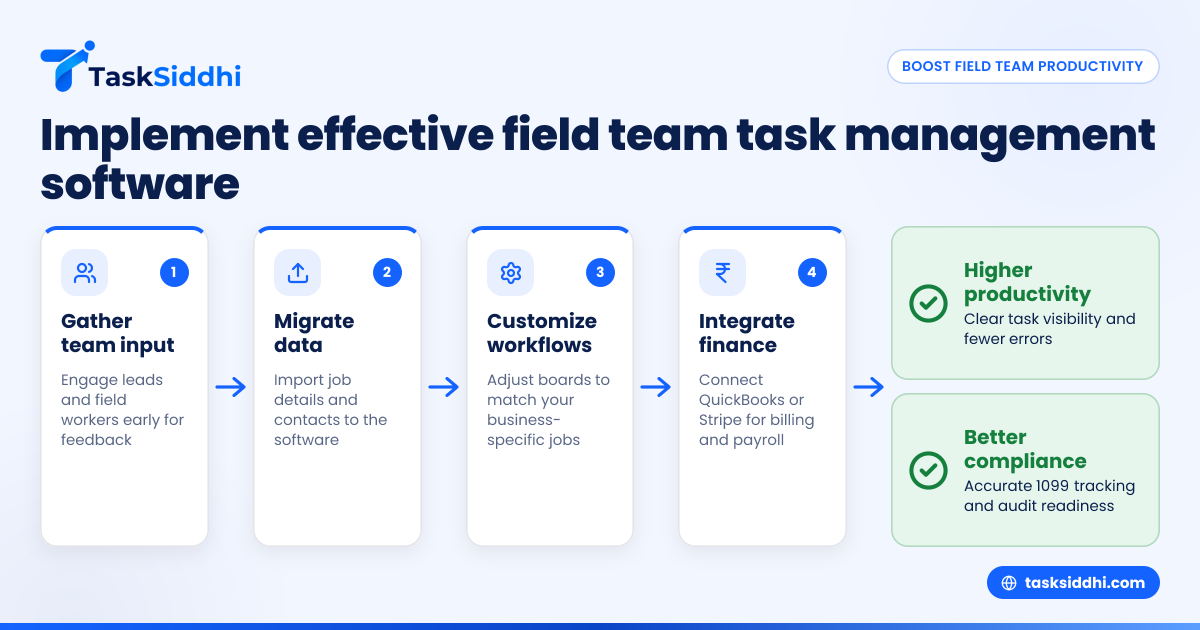
- Involve team leads and field workers early for feedback.
- Migrate existing job details and contact info to the software.
- Customize workflows and boards to your business-specific jobs.
- Use integrations like QuickBooks or Stripe to connect invoices and payments.
- Set up automated notifications and reminders.
- Monitor usage and encourage consistent updates.
- Analyze productivity reports monthly to identify areas for improvement.
Using the software daily helps teams build trust in the platform and reduces reliance on outdated tools like Excel sheets or WhatsApp messages.
Can task management software handle 1099 contractors and compliance?
Yes, a good system supports independent contractors common in US field services. It tracks hours worked and sites visited for accurate 1099 reporting at year-end. Managers can maintain digital records that help meet audit requirements and IRS guidelines.
Some platforms provide compliance reminders to avoid CAN-SPAM or TCPA violations when communicating via phone or email. Ensuring traceable communication and documented job completion protects your business from disputes or penalties.
How does task management integrate with existing US business tools?
Integrations streamline financial and operational workflows critical for US businesses. The software can sync work hours and job costs with QuickBooks for seamless payroll and invoicing. Payment processing through Stripe ensures timely collections after service completion.
Additionally, data can feed into ERP systems for manufacturing or larger service companies. API connections and import/export options help your business maintain a unified data flow, eliminating errors from manual entry.
What common mistakes do US businesses make when managing field teams?
Many businesses rely on WhatsApp groups or paper job tickets that get lost or forgotten. This creates communication delays and missed deadlines, frustrating customers and staff alike. Lack of centralized reporting blinds management to productivity trends.
Skipping mobile apps or failing to train teams leads to low adoption and inconsistent usage. Ignoring automation results in excessive admin time spent tracking jobs manually. A field team task management system fixes these issues with visibility, real-time updates, and process automation.
What next steps should US managers take to boost productivity?
Explore digital task management solutions designed for field teams. Check features like boards and views, time tracking, and automation to understand capabilities. Using a mobile app guarantees your staff in the field stays connected.
Many US businesses see results quickly by moving from manual job management to software platforms tailored for their workflow. To learn more, take a product tour or compare plan options at pricing. Efficient task management will help your team deliver excellent service and grow revenue.
Frequently asked questions
What is field team task management software?
It’s a digital platform that helps assign, track, and complete jobs performed by workers outside the office. Features include job boards, mobile apps, time tracking, proof of site visits, and reporting.
How does task management software handle site visit proof?
Field workers upload timestamped photos, signatures, or notes directly through the mobile app. This creates verifiable records of work done at customer locations.
Can I integrate task management software with QuickBooks?
Most US-focused solutions offer integration to sync hours, expenses, and billing data with QuickBooks, simplifying payroll and invoicing.
Is task management software useful for small field teams?
Yes, even teams of 5-30 people benefit from better organization, real-time communication, and automated reporting. It saves a lot of time compared to manual systems.
How secure is field team task management software?
Reputable providers use encryption and secure servers to keep your data safe. Look for platforms that comply with US data privacy expectations.
Can AI features reduce scheduling conflicts?
Yes, AI can analyze availability and assign jobs automatically to avoid overlaps and minimize downtime. It ensures tasks match the right worker’s skills and location.