














Switching from WhatsApp groups to job card software lets small US field teams track tasks efficiently, reduce errors, and improve communication. Job card software offers structured job management with proof, time tracking, and reporting — features missing in chat groups. This change streamlines operations and helps meet customer expectations on time and quality.
Key takeaways
- Job card software improves task organization, reducing confusion common in WhatsApp groups.
- Mobile apps support field staff with real-time updates, job status, and photo proof.
- Time tracking and reporting provide oversight for managers to optimize productivity.
- Automated workflows cut repetitive admin work and improve job completion accuracy.
- AI job card features enhance task allocation and predictive insights for better resource use.
- Compliance with US business laws and invoicing requirements is easier with dedicated software.
Why do US small field teams outgrow WhatsApp groups for job tracking?
WhatsApp groups are informal and designed for quick chats, not task management. They work initially when a team is small and jobs are simple, but soon message clutter increases. Important details like deadlines, job status, and proof photos can get lost in long conversation threads. This creates confusion over who is responsible for what and when.
Unlike WhatsApp, job card software creates a clear, structured workflow for each job. Every field visit or service task has a dedicated job card with details, timelines, assigned staff, and proof of completion. Notifications keep everyone aligned, and changes are tracked. Your team won’t need to scroll endlessly to find job updates.
For example, a plumbing service in Detroit can use job card software to assign emergency repairs with priority, track parts usage, and confirm task completion with photos. This ensures every job is documented and invoiced accurately, avoiding disputes or missed follow-ups.
How can job card software help track time and improve billing accuracy?
Job card software typically includes time tracking tools that let field workers clock hours spent on each task directly from their mobile device. This eliminates guesswork or manual timesheets, improving accuracy for payroll and client billing.
With accurate time logs linked to job cards, managers can quickly verify hours before invoicing. This reduces billing errors and disputes, which is crucial for service businesses in cities like Chicago where customer satisfaction and compliance with state sales tax can impact revenue.
Integrations with common US finance tools, such as QuickBooks and Stripe, streamline invoicing and payment collection. Automatically recorded time and materials from job cards ensure invoices match the work done.
What is an ai job card and how does it make task management smarter?
An ai job card uses artificial intelligence to analyze job data and assist in task management. It can prioritize jobs based on urgency, predict delays, and suggest the best staff member for each task based on skills and location. This reduces manual scheduling and improves response times.
For example, an HVAC company in Houston might use ai job cards to automatically assign maintenance requests that need immediate attention and reschedule less urgent jobs accordingly. AI can also flag unusual job durations that might indicate underlying issues requiring manager review.
The intelligence in ai job cards helps your team be proactive, reduce downtime, and allocate resources efficiently, saving time and money.
What does switching from WhatsApp to job card software cost US small businesses?
Switching to job card software typically involves subscription fees, which vary based on features and the number of users. Most providers offer tiered plans where you pay more for advanced reporting or automation features.
For a small service team of 5 to 30 people, this cost usually ranges from $10 to $30 per user per month. Compared to the cost of lost time, errors, and missed jobs when using WhatsApp groups, this is a solid investment in reliability and growth.
Many platforms also offer free trials or free tiers with limited capabilities so you can explore before committing. Be sure to check for mobile access via a mobile app and compatibility with your existing tools like QuickBooks.
How to switch smoothly from WhatsApp groups to job card software?
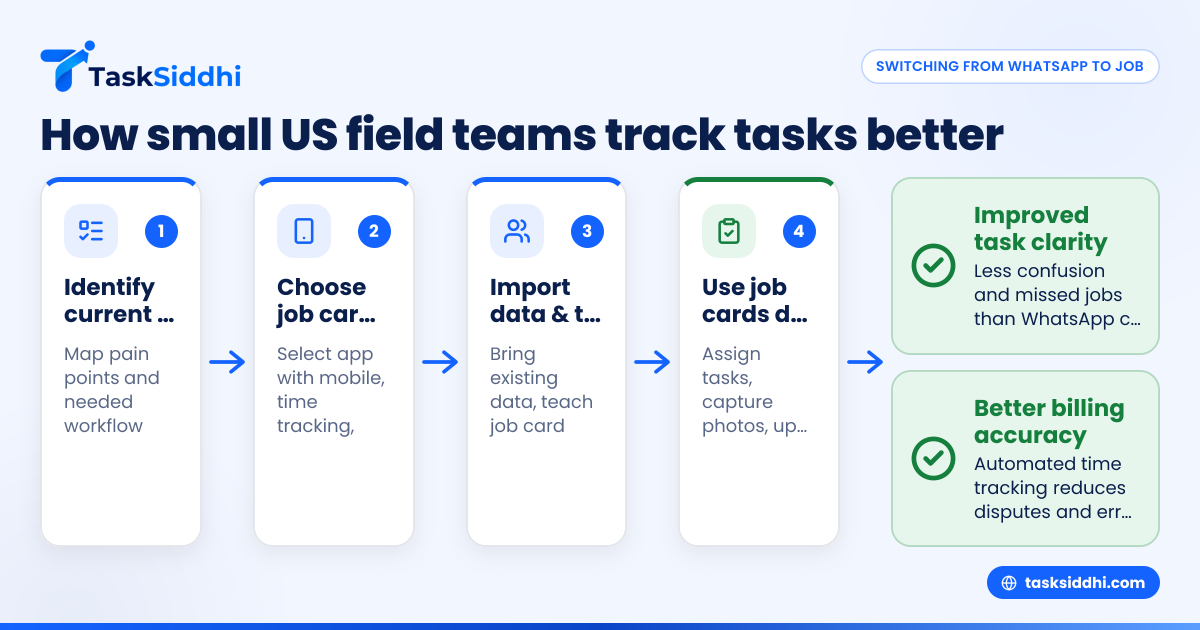
Switching smoothly requires clear steps and team buy-in. First, identify key pain points in your current task tracking and map out your job workflow. Next, select job card software that fits your team’s needs, offering mobile access and necessary features.
Import existing job and client data from spreadsheets or CRM systems to avoid starting from scratch. Train both field and office staff on creating and updating job cards, using time tracking, and attaching photo proof.
Gradually reduce WhatsApp use for jobs by handling new tasks in the software. Use built-in reporting to monitor progress and improve workflows over time. Communicate benefits clearly to encourage adoption, while relying on notifications to keep everyone updated.
Why is a mobile app essential for field teams using job card software?
A mobile app ensures field staff can access and update job information in real time, wherever they are. This immediacy reduces delays caused by email or text message back-and-forth.
From the job site in Detroit or Houston, workers can capture photos for proof, update status, log hours worked, and access detailed instructions. Managers see live updates and can respond quickly if support is needed.
Mobile apps also enable offline working with sync capabilities, critical in areas with poor cell coverage. This flexibility keeps field teams effective and reduces paperwork considerably.
How does automation in job card software save time for US small businesses?
Automation features allow repetitive tasks such as job assignment, reminder notifications, and status updates to happen without manual intervention. For example, when a new job is created, the system can automatically assign it based on predefined rules like technician skills or location.
This reduces administrative overhead and human errors. Your team avoids having to chase updates or reminders, which often happens on WhatsApp groups. Automation supports consistent workflows and faster job completion.
Automation can also trigger alerts for overdue jobs or flag jobs missing proof or time entries, helping managers stay ahead of potential issues before they affect customers.
How to comply with US business requirements using job card software?
Job card software often supports record keeping required to comply with state sales tax rules and service industry tracking. You can attach proof of service like photos or signatures, essential to avoid disputes during audits.
With integrated time tracking, job costs, and customer details all on record, generating invoices is simpler and more accurate. This helps meet targets for timely billing, essential for cash flow in small businesses.
Make sure the software you choose respects US privacy rules around customer data and communications. Using templates compliant with CAN-SPAM and TCPA laws for customer outreach prevents regulatory issues.
Why move beyond WhatsApp groups for client work management?
WhatsApp groups lack important job management controls like prioritization, workflow status tracking, and integration with business tools. For client work that often requires documentation and proof, relying on chat leads to lost jobs, delayed responses, and unhappy clients.
Job card software tailored for client work adds professionalism by capturing detailed job data, managing deadlines, and enabling easy client communication. This helps small businesses compete with established firms in US metro areas.
For agencies or consulting teams managing multiple clients, having a centralized system reduces reliance on scattered chats, improves accountability, and ensures transparent billing.
Switching to job card software gives your US field team the clarity, control, and mobile flexibility needed to manage jobs well. See how it works with a product tour or explore plans on the pricing page. Transform your field operations today.
Frequently asked questions
Can I use job card software on a smartphone in the field?
Yes. Most job card software comes with a dedicated mobile app that lets your field staff update job status, capture photo proof, and log hours directly from their smartphones. This real-time access improves accuracy and speed of task completion.
Is job card software affordable for small teams?
Many job card software solutions offer tiered pricing suitable for small US teams of 5 to 30 people. Costs typically range from $10 to $30 per user per month, which is often justified by savings from reduced errors, improved billing, and better customer satisfaction.
How difficult is it to transition from WhatsApp groups to job card software?
Transitioning requires some initial training and process adjustment. Start by mapping your current workflow, then onboard gradually. Your team will appreciate the clarity and ease once they experience features like task notifications and proof capture in the software.
What features should I look for in job card software?
Look for mobile accessibility, easy job creation, time tracking, photo proof capabilities, and integration with your finance tools like QuickBooks or Stripe. Automation and reporting tools help optimize team performance and provide visibility into operations.
Can job card software handle urgent or last-minute jobs?
Yes. Most platforms support dynamic job assignment and notifications that let managers rapidly reallocate field staff. With features like the ai job card, some software can even predict delays and reorder tasks to prioritize urgent work.
Are job cards useful for all types of field services?
Absolutely. Whether you run plumbing, HVAC, landscaping, pest control, or home cleaning services, job card software standardizes task tracking, proof, and billing. This consistency helps maintain service quality and build customer trust in US markets.